

What if your sales, marketing, finance, customer support, and daily operations could work together instead of operating through disconnected applications? Discover how Zoho One helps small and growing businesses simplify workflows, improve collaboration, and manage their operations through one integrated software ecosystem.
The Hidden Complexity of Running a Modern Business
Running a business today requires more than delivering excellent products or services.
Companies must manage customer relationships, generate leads, communicate with clients, issue invoices, coordinate projects, support employees, monitor financial performance, and make informed decisions.
To handle these responsibilities, many businesses gradually adopt different software applications.
One platform manages customer relationships. Another handles email marketing. A separate system manages invoices, while project management and customer support require additional tools.
Initially, this approach may seem practical.
But as the business grows, disconnected applications can create significant operational challenges.
Customer information gets duplicated. Employees repeatedly enter the same data into different systems. Important updates fail to reach the right department, and managers struggle to obtain a complete picture of business performance.
The problem is not necessarily a lack of technology. It is the lack of integration between the technologies a business already uses.
This is where Zoho One offers a different approach.
Rather than treating each business function as an isolated activity, Zoho One brings a broad range of applications together in one connected ecosystem.
What Is Zoho One?
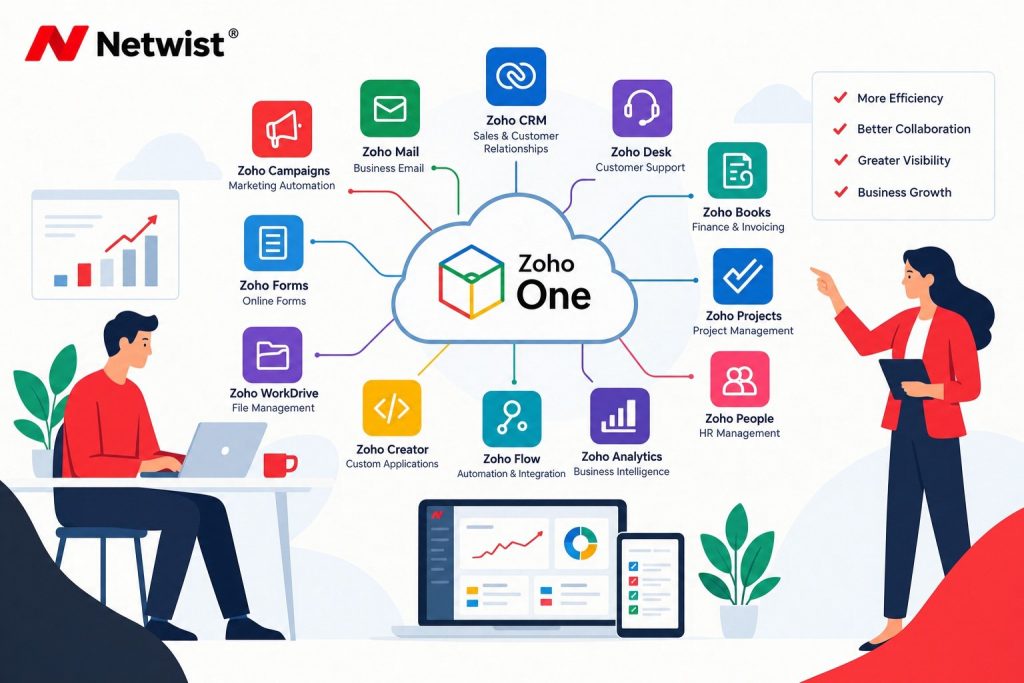
Zoho One is an integrated suite of business applications designed to help organizations manage multiple aspects of their operations from a unified environment.
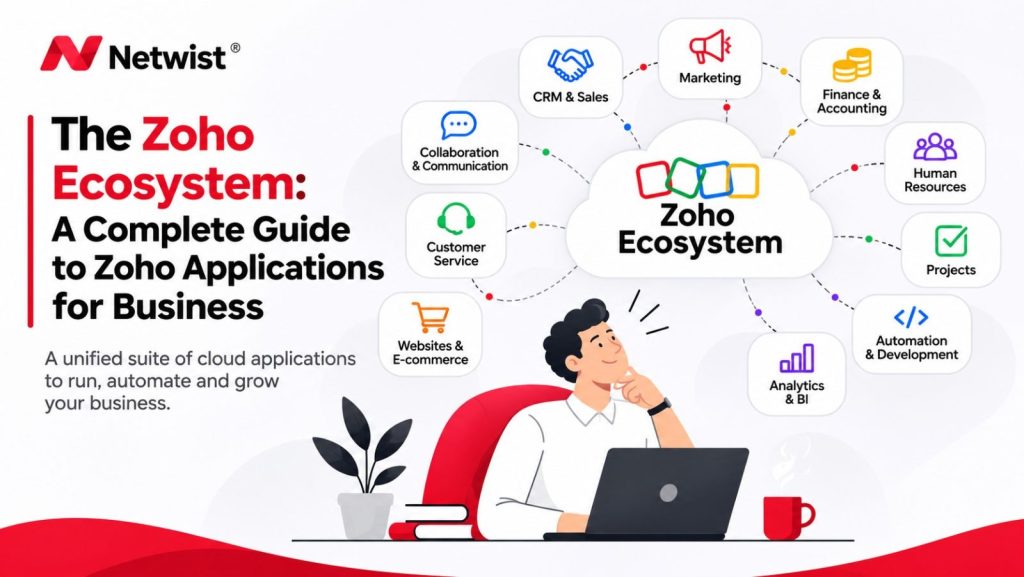
Often described as an operating system for business, Zoho One brings together tools for sales, marketing, customer support, finance, human resources, communication, collaboration, analytics, and business process automation.
The platform includes more than 50 applications, providing businesses with a broad selection of tools that can work together through supported integrations.
Instead of purchasing and managing numerous unrelated software subscriptions, organizations can evaluate a connected suite of applications under a consolidated licensing and administration model.
Some of the best-known applications within Zoho One include:
- Zoho CRM: Customer relationship management and sales pipeline tracking.
- Zoho Mail: Professional business email.
- Zoho Campaigns: Email marketing and campaign management.
- Zoho Desk: Customer support and ticket management.
- Zoho Books: Accounting, invoicing, and financial workflows.
- Zoho Projects: Project planning and task management.
- Zoho People: Human resources management.
- Zoho Analytics: Business intelligence and reporting.
- Zoho Flow: Application integration and workflow automation.
- Zoho Creator: Custom business application development.
- Zoho WorkDrive: File management and collaboration.
- Zoho Forms: Online forms and data collection.
The real value of Zoho One is not simply the number of applications included.
It is the opportunity to connect people, information, and business processes across departments.
Why Disconnected Business Applications Create Problems
Many growing businesses experience the same challenges when their software tools operate independently.
1. Duplicate Data and Inconsistent Information
Imagine a customer whose contact information appears in your CRM, accounting software, email marketing platform, and customer support system.
If the customer changes their email address, employees may need to update several applications manually.
When updates are missed, departments begin working with inconsistent information.
An integrated ecosystem can reduce unnecessary duplication by connecting supported applications and synchronizing relevant data.
2. Repetitive Administrative Work
Employees frequently spend time copying information between systems, updating spreadsheets, sending internal notifications, and manually transferring customer details.
These activities may seem small, but they accumulate over time.
Automating suitable processes can free employees to focus on higher-value work.
3. Limited Visibility Across Departments
A sales manager may understand the current sales pipeline but have limited visibility into outstanding invoices.
A customer support employee may receive a complaint without knowing the customer’s recent purchase history.
When information is fragmented, decisions become slower and less informed.
4. Increasing Software Management Complexity
Multiple vendors often mean separate subscriptions, administrative accounts, renewal dates, security settings, and support processes.
An integrated platform can simplify administration, although businesses must still evaluate licensing, implementation, and ongoing operational costs.
How Zoho One Connects Your Business Operations
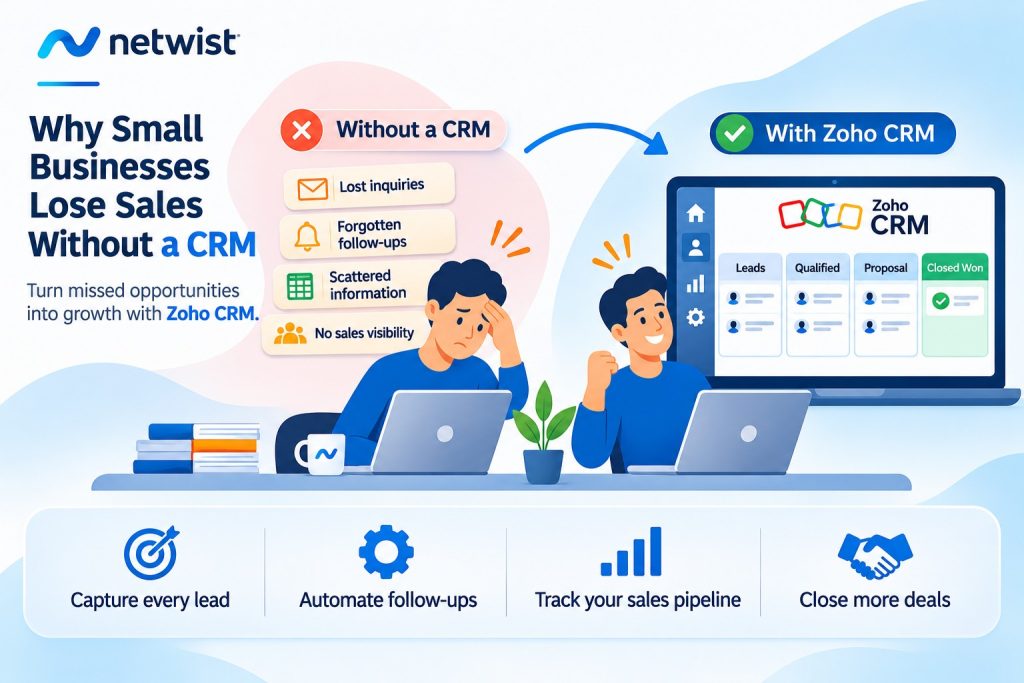
1. Sales and Customer Relationships with Zoho CRM
Sales activities are central to the growth of most businesses.
Zoho CRM helps organizations capture leads, manage customer information, track opportunities, and organize their sales pipelines.
Within the Zoho One ecosystem, CRM can serve as a central component of a broader customer management process.
For example, a business can connect website forms to Zoho CRM, assign new inquiries to sales representatives, and create follow-up tasks.
Once an opportunity progresses, relevant information can be shared with other applications through supported integrations.
Practical example
A potential customer submits a request through your website.
The information enters Zoho CRM, where a new lead is created.
A salesperson receives a notification, contacts the prospect, and records the outcome.
If the opportunity becomes a confirmed project, the next steps can involve project management, document signing, or invoicing applications.
This creates a more structured journey from the first inquiry to service delivery.
2. Marketing Automation with Zoho Campaigns
Marketing and sales are more effective when they share relevant information.
Zoho Campaigns enables businesses to create email campaigns, organize audiences, and measure engagement.
When connected with Zoho CRM, marketing teams can use supported synchronization features to coordinate campaigns with customer and lead information.
For example, a consulting company could create separate campaigns for prospective customers interested in different services.
A potential customer interested in website development might receive relevant information about web design, hosting, and digital marketing.
Another prospect interested in business automation could receive content about Zoho CRM and workflow integration.
This approach helps businesses deliver more relevant communication.
Marketing activities must, of course, follow applicable privacy and electronic marketing requirements, including consent and unsubscribe obligations where required.
3. Professional Communication with Zoho Mail
Email remains one of the most important business communication channels.
Zoho Mail provides professional email hosting with support for custom business domains, security controls, and an advertising-free interface.
Within Zoho One, businesses can combine email communication with collaboration and customer management applications.
For example, employees can manage business correspondence through Zoho Mail while using supported CRM integrations to associate relevant communications with customer records.
This can reduce the need to search across separate systems when reviewing customer interactions.
Zoho’s commitment to an advertising-free software model also makes its ecosystem appealing to organizations that prioritize privacy.
4. Customer Support with Zoho Desk
Winning a customer is only the beginning of a business relationship.
Providing reliable support after the sale is equally important.
Zoho Desk helps organizations manage customer requests through a structured ticketing environment.
Instead of relying exclusively on shared email inboxes, support teams can assign requests, track progress, establish priorities, and monitor resolution activity.
Practical example
A customer reports a technical problem.
A support ticket is created in Zoho Desk and assigned to the appropriate employee.
The support team can review relevant customer information through configured integrations and update the ticket as work progresses.
Managers can monitor unresolved requests and identify recurring support issues.
This improves accountability and provides a more organized customer service experience.
5. Financial Management with Zoho Books
Managing quotations, invoices, expenses, and payments is essential for business operations.
Zoho Books provides accounting and financial management capabilities that can connect with other applications in the Zoho ecosystem.
For example, a business can establish a workflow connecting its sales process with invoicing.
Once a deal is confirmed, relevant customer and transaction information can support the preparation of invoices, subject to the integration and workflow configuration.
This reduces unnecessary re-entry of information and helps improve coordination between sales and finance.
Important: Businesses operating in Greece, Cyprus, or other jurisdictions should verify local accounting, tax, electronic invoicing, and reporting requirements before adopting Zoho Books as their primary accounting platform. Availability and suitability of specific features vary by country.
6. Project Management with Zoho Projects
After a sale is completed, many businesses must deliver a project or service.
Zoho Projects provides tools for organizing tasks, milestones, deadlines, responsibilities, and project progress.
Consider a web development company that has just signed a new client.
The sales process may begin in Zoho CRM, while project execution takes place in Zoho Projects.
The project manager can assign tasks to designers and developers, monitor deadlines, and track progress.
Relevant project information can then support customer communication and internal coordination.
This helps businesses establish a clearer transition between sales and delivery.
7. Human Resources with Zoho People
As businesses grow, employee administration becomes more complex.
Zoho People provides tools for managing employee information and selected HR processes, including attendance, leave management, and performance-related workflows.
Instead of relying on disconnected spreadsheets, organizations can manage supported HR activities through a structured application.
This can be particularly useful for businesses with expanding teams or multiple departments.
8. Business Intelligence with Zoho Analytics
Having business data is useful.
Understanding what that data means is even more valuable.
Zoho Analytics helps organizations create reports, dashboards, and visualizations using information from supported applications and external data sources.
For example, a business might combine sales information from Zoho CRM with marketing data and financial information to evaluate which activities contribute most effectively to revenue.
Managers can monitor indicators such as:
- Lead generation and conversion.
- Sales pipeline value.
- Revenue trends.
- Marketing campaign performance.
- Customer support activity.
- Project performance.
The availability and accuracy of cross-application reporting depend on the connected data sources, permissions, and configuration.
9. Workflow Automation with Zoho Flow
One of the most valuable opportunities within an integrated software ecosystem is business process automation.
Zoho Flow allows organizations to connect applications and build automated workflows.
For example:
Website Form → Zoho CRM → Sales Notification → Follow-Up Task
Or:
Confirmed Customer → Project Creation → Internal Notification
These workflows can reduce repetitive tasks and improve consistency.
More advanced scenarios may require additional configuration, custom logic, or integration work.
The objective should always be to automate well-defined processes rather than introduce unnecessary complexity.
10. Custom Applications with Zoho Creator
Not every business process fits perfectly into a standard application.
Zoho Creator is a low-code development platform that enables organizations to build custom business applications.
For example, a company might require a specialized approval process, an internal request management system, or a custom operational dashboard.
Zoho Creator can help address requirements that are not fully covered by standard software configurations.
This makes Zoho One attractive to businesses that need both ready-made applications and opportunities for customization.
Practical Example: Running a Service Business with Zoho One
Consider a growing digital services company offering website development, technical support, and consulting.
Before adopting an integrated platform, the company uses separate tools for customer management, email marketing, project tracking, invoicing, and support.
Employees frequently transfer information manually between systems.
Now imagine the company implements selected Zoho One applications.
Step 1 — Lead Generation
A potential customer completes a website form.
Zoho Forms captures the inquiry, and a supported integration creates a lead in Zoho CRM.
Step 2 — Sales Management
The sales team evaluates the inquiry, prepares a proposal, and tracks the opportunity in Zoho CRM.
Step 3 — Agreement
Once the customer accepts the proposal, Zoho Sign can support the electronic signing process where appropriate.
Step 4 — Project Delivery
A project is created in Zoho Projects, with tasks assigned to the relevant employees.
Step 5 — Invoicing
The finance team uses Zoho Books, where suitable for the organization’s accounting requirements, to manage invoicing and financial records.
Step 6 — Customer Support
After delivery, support requests can be managed through Zoho Desk.
Step 7 — Performance Monitoring
Zoho Analytics can consolidate relevant information into dashboards, helping management review sales, delivery, and financial performance.
The result is a more connected business process.
Not every step is automatic by default. Integrations, permissions, workflow rules, and data mapping must be configured appropriately.
How Zoho One Can Help Hotels and Hospitality Businesses
The hospitality sector provides another practical example of the benefits of connected business applications.
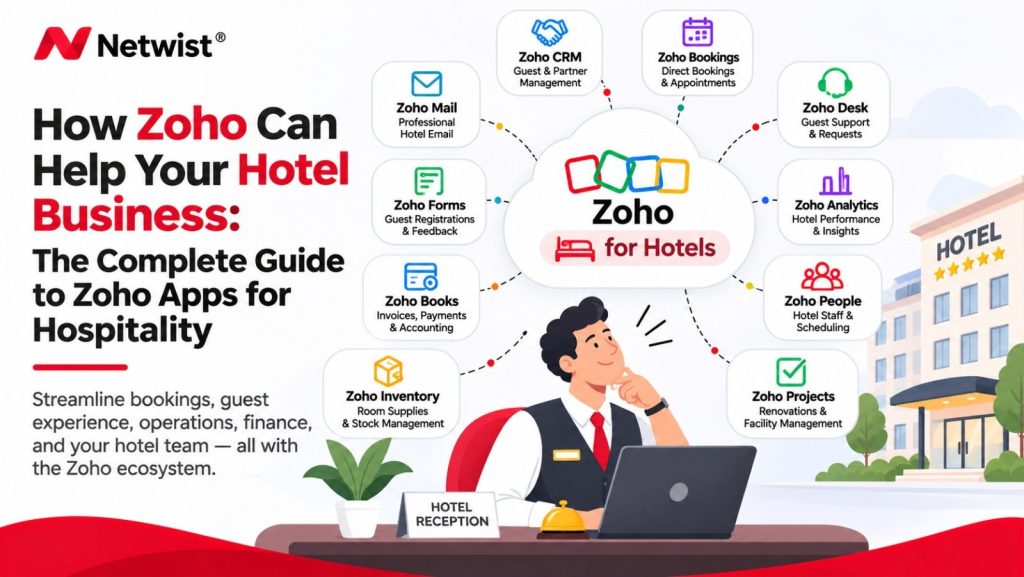
Hotels and accommodation providers manage guest inquiries, direct booking requests, marketing campaigns, customer relationships, staff coordination, and operational activities.
Selected Zoho One applications can support many of these processes.
For example:
- Zoho CRM can help organize guest relationships and business inquiries.
- Zoho Campaigns can support permission-based guest communication and promotional campaigns.
- Zoho Forms can collect inquiries from websites.
- Zoho Desk can organize customer service requests.
- Zoho Analytics can provide reporting across supported data sources.
- Zoho Flow can connect compatible systems and automate selected processes.
For hospitality businesses, Zoho One should generally complement rather than automatically replace specialist property management systems, booking engines, or channel managers.
Any integration with those systems requires technical and operational evaluation.
The Business Benefits of Using One Integrated Ecosystem
Better Collaboration Between Departments
When applications share relevant information through supported integrations, employees can coordinate more effectively.
Sales, marketing, support, and operations teams can work with a more consistent view of customers and activities.
Reduced Manual Work
Workflow automation can reduce repetitive data entry, notifications, and administrative tasks.
This gives employees more time for customer-facing and strategic activities.
Improved Visibility
Dashboards and reports can provide a broader view of business performance.
Management can identify bottlenecks, monitor progress, and make more informed decisions.
Simpler Software Administration
A unified ecosystem can simplify application access, user administration, and subscription management.
However, the exact benefits depend on the organization’s software requirements and existing systems.
Scalability
Businesses can begin with a selected group of applications and expand their use of the ecosystem as their requirements evolve.
This gradual approach can help teams adopt new processes without unnecessary disruption.
Is Zoho One More Cost-Effective Than Separate Applications?
One of the main reasons businesses evaluate Zoho One is the potential to consolidate multiple software subscriptions.
Instead of paying separately for CRM, email marketing, project management, support, analytics, and other tools, organizations can assess a broader application suite under a single licensing structure.
However, lower software costs should never be assumed automatically.
The real financial benefit depends on factors such as:
- The number of employees requiring licenses.
- The applications the business actually needs.
- The selected licensing model.
- The cost of existing subscriptions.
- Data migration and implementation requirements.
- Employee training.
- Customization and integration expenses.
- Ongoing administration and support.
Zoho One offers different licensing approaches, including an all-employee model with specific eligibility conditions.
Businesses should review current licensing terms and compare the total cost of ownership before making a decision.
The right question is not simply how much Zoho One costs, but how much value an integrated platform can deliver compared with the organization’s existing software environment.
Zoho One vs. Using Separate Business Applications
| Business Consideration | Multiple Independent Applications | Zoho One |
|---|---|---|
| Software management | Multiple vendors and subscriptions | More consolidated ecosystem |
| Customer information | May be fragmented | Can be connected across supported apps |
| Automation | Often requires third-party integrations | Native integrations and Zoho Flow |
| Reporting | Separate reports across tools | Cross-application reporting options |
| User administration | Multiple administration environments | Centralized administration capabilities |
| Customization | Depends on each vendor | Zoho Creator and application customization |
| Implementation | Individual tool configurations | Coordinated, multi-application planning |
| Flexibility | Freedom to select specialized tools | Broad integrated suite with external integrations |
Zoho One is not necessarily the best solution for every organization.
Businesses with highly specialized requirements may still need dedicated applications or third-party integrations.
The decision should be based on business needs, not simply the number of available applications.
Why Proper Zoho One Implementation Matters
Purchasing Zoho One does not automatically create an integrated business.
The real transformation happens when applications are selected, configured, and connected around clearly defined processes.
A successful implementation should begin with several questions:
- Which business processes currently create the most delays?
- Where is information being entered multiple times?
- Which departments need better collaboration?
- What applications are already in use?
- Which systems should be retained or replaced?
- What data needs to be migrated?
- Which workflows should be automated?
- What reporting does management require?
Trying to deploy every available application simultaneously may overwhelm employees and increase implementation complexity.
A more practical approach is to start with the areas that offer the clearest business value.
For example, a company might begin with Zoho CRM, Zoho Mail, and Zoho Projects before introducing Zoho Desk, Zoho Analytics, or additional automation.
How Netwist Can Help Your Business Implement Zoho One
At Netwist, we believe business technology should work together to support clear operational goals.
An integrated software ecosystem can create significant value, but achieving that value requires more than activating applications.
It requires understanding how a business operates and designing a solution around its actual requirements.
Netwist can help businesses explore and plan Zoho-based solutions through a combination of business technology consulting, application configuration, website integration, and workflow optimization.
Business Needs Assessment
Understanding existing applications, identifying disconnected processes, and defining priorities for improvement.
Zoho Application Planning
Identifying which Zoho One applications are most relevant to the organization’s needs and planning a practical implementation sequence.
CRM and Website Integration
Exploring how website inquiries, customer records, and sales workflows can be connected using Zoho CRM and compatible tools.
Workflow Automation
Designing suitable automations to reduce repetitive activities and improve information flow between applications.
Application Integration and Customization
Evaluating integrations between Zoho applications and supported external systems, including requirements for custom workflows.
Ongoing Improvement
Reviewing how applications are used, identifying opportunities for optimization, and supporting a more consistent digital operating environment.
The goal is not to introduce dozens of applications simply because they are available.
It is to build a connected digital ecosystem that makes the business easier to manage.
Frequently Asked Questions About Zoho One
What is Zoho One used for?
Zoho One is a suite of business applications used to manage activities such as sales, marketing, finance, customer support, human resources, projects, collaboration, and analytics.
Is Zoho One suitable for small businesses?
Yes. Zoho One can be suitable for small businesses that need several connected applications. Its value depends on the organization’s requirements, licensing needs, and ability to implement the relevant tools effectively.
Does Zoho One include Zoho CRM?
Yes. Zoho CRM is one of the applications available within Zoho One, providing tools for lead management, customer relationships, and sales pipeline tracking.
Does Zoho One include business email?
Yes. Zoho Mail is included in the Zoho One ecosystem and supports professional business email services.
Can Zoho One replace all existing business software?
Not necessarily. Although Zoho One covers many business functions, specialized applications may still be necessary. Organizations should evaluate integrations, local regulatory requirements, and feature limitations before replacing existing systems.
Can Zoho One integrate with WordPress?
Yes. Selected Zoho applications can integrate with WordPress through supported plugins, APIs, forms, and integration services. Available functionality depends on the applications and implementation approach.
Does Zoho One support automation?
Yes. Zoho One includes applications with workflow automation capabilities, and Zoho Flow supports integration and automation across compatible applications.
Can businesses start with only a few Zoho One applications?
Yes. Organizations can implement selected applications first and expand gradually. Licensing conditions still apply to the chosen subscription model.
Is Zoho One GDPR compliant?
Zoho provides privacy, security, and data protection capabilities designed to support organizations with compliance obligations. However, GDPR compliance also depends on the business’s configuration, lawful processing practices, contractual arrangements, and internal policies.
Conclusion: One Business, One Connected Ecosystem
Modern businesses depend on technology to manage almost every aspect of their operations.
But adding more applications does not automatically create greater efficiency.
When systems operate independently, information becomes fragmented, employees repeat unnecessary tasks, and management loses visibility into important activities.
Zoho One offers an alternative approach.
By bringing sales, marketing, finance, support, collaboration, and automation tools into one ecosystem, it gives businesses an opportunity to simplify operations and improve coordination.
The greatest value comes from selecting the right applications, connecting the right processes, and implementing the platform according to real business requirements.
For small and growing businesses, this can create a more organized foundation for sustainable growth.
Because your business should operate as one connected organization — not as a collection of disconnected applications.
Ready to Simplify Your Business with Zoho One?
Bring your business applications, teams, and workflows together with a connected Zoho ecosystem.
At Netwist, we help businesses explore Zoho solutions, plan integrations, and identify opportunities to streamline operations through better-connected technology.
Whether you’re considering Zoho One for the first time or looking to improve the way your existing applications work together, we can help you evaluate the next steps.
Request a Zoho Consultation with Netwist
Discover how a connected business ecosystem can support greater efficiency, visibility, and growth.