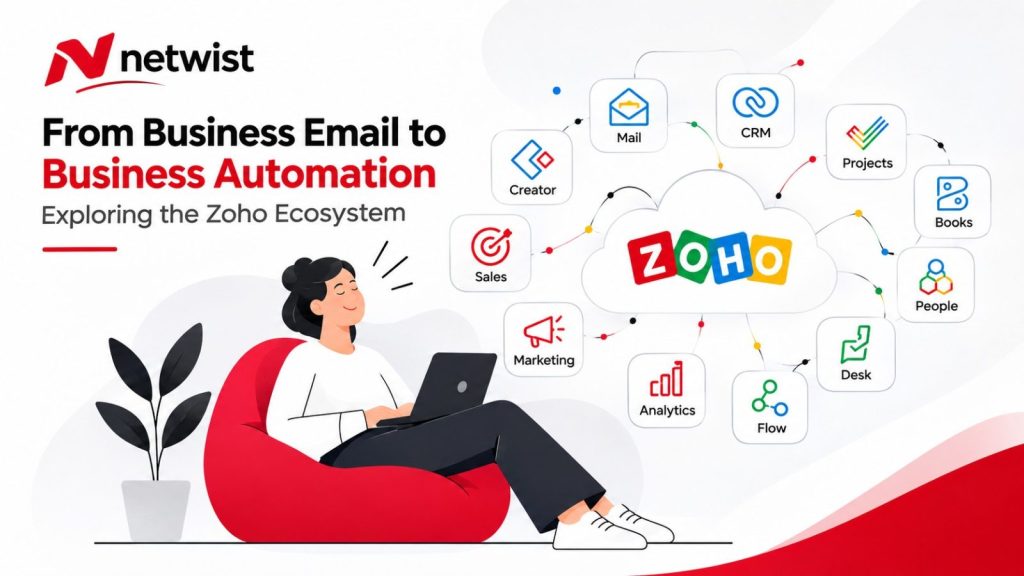


In today’s competitive business environment, managing customer relationships, sales, marketing, finances, human resources, and daily operations efficiently is essential for sustainable growth. As organizations expand, the need for integrated business software becomes increasingly important.
The Zoho Ecosystem is one of the most comprehensive collections of cloud-based business applications available, providing organizations with a connected suite of tools designed to manage nearly every aspect of their operations.
From Customer Relationship Management (CRM) and digital marketing to accounting, project management, customer support, business intelligence, and artificial intelligence, Zoho applications help businesses streamline processes, improve productivity, and reduce operational complexity.
One of Zoho’s most significant advantages is its integrated approach. Instead of relying on numerous disconnected software solutions, businesses can use multiple Zoho applications that communicate with each other, share information, and support automated workflows.
In this comprehensive guide, we explore what the Zoho Ecosystem is, the most important Zoho applications, what each application does, and how businesses can benefit from using them.
What Is the Zoho Ecosystem?
The Zoho Ecosystem is an extensive collection of cloud-based business applications developed by Zoho Corporation, a global software company specializing in business productivity, collaboration, and digital transformation solutions.
The ecosystem includes more than 60 business applications covering customer relationship management, marketing, sales, finance, human resources, project management, analytics, IT operations, and business process automation.
Each application is designed to address specific business requirements, while many can be integrated to create a connected digital working environment.
For example, a company can capture a lead through Zoho Forms, manage the sales opportunity in Zoho CRM, create a project in Zoho Projects, generate invoices using Zoho Books, and provide customer support through Zoho Desk.
This interconnected approach helps businesses reduce repetitive tasks, improve information accuracy, and maintain better visibility across departments.
What Is Zoho One?
Zoho One is an integrated business software suite that provides access to more than 50 Zoho applications through a unified subscription.
It is designed to function as a comprehensive business operating environment, bringing together applications for sales, marketing, finance, HR, customer support, productivity, and operations.
Zoho One also provides centralized administration, user management, access controls, and integration capabilities.
However, Zoho One and the broader Zoho Ecosystem are not identical. Some Zoho products, advanced capabilities, and specialized services may require separate subscriptions or additional licensing.
For companies seeking to consolidate their technology infrastructure, Zoho One can provide an alternative to managing numerous independent software subscriptions.
Zoho Ecosystem Applications: Complete Overview
The Zoho Ecosystem consists of applications organized around different business functions. Below is a detailed overview of the most important Zoho products and their practical business applications.
1. Zoho Applications for Sales and Customer Relationship Management
Zoho CRM – Customer Relationship Management
Zoho CRM is one of the central applications within the Zoho Ecosystem. It helps businesses manage leads, contacts, accounts, sales opportunities, customer interactions, and sales pipelines. The platform includes workflow automation, sales forecasting, reporting, dashboards, and tools for improving sales team productivity. Zoho CRM is particularly valuable for B2B companies, service providers, real estate agencies, consulting firms, and organizations with structured sales processes. By centralizing customer information, businesses can improve lead management, monitor sales performance, and build stronger customer relationships.
Bigin by Zoho CRM – CRM for Small Businesses
Bigin by Zoho CRM is a simplified customer relationship management platform designed for small businesses, startups, and professionals who need an easy-to-use sales management solution. It provides visual sales pipelines, contact management, task tracking, communication history, and basic automation. Bigin is especially useful for businesses transitioning from spreadsheets or manual customer tracking systems to a more structured CRM environment.
Zoho SalesIQ – Live Chat and Website Visitor Engagement
Zoho SalesIQ is a customer engagement platform that enables businesses to communicate with website visitors through live chat, chatbots, and automated conversations. It also provides visitor tracking and behavioral insights that help sales and marketing teams identify potential customers. Zoho SalesIQ is particularly useful for e-commerce businesses, service providers, SaaS companies, and organizations looking to increase website conversions and improve real-time customer engagement.
Zoho Bookings – Online Appointment Scheduling
Zoho Bookings is an online scheduling application that allows customers to book appointments based on available time slots. It supports appointment reminders, staff availability, calendar synchronization, and scheduling automation. The platform is useful for consulting firms, healthcare service providers, educational organizations, professional services, and businesses that rely on scheduled meetings or appointments.
Zoho Forms – Online Forms and Data Collection
Zoho Forms allows businesses to create online forms for lead generation, customer inquiries, registrations, surveys, applications, and internal data collection. Forms can be connected to other Zoho applications to automatically transfer information into CRM records or operational workflows. It is particularly useful for companies seeking to eliminate paper-based processes and reduce manual data entry.
Zoho Sign – Electronic Signatures
Zoho Sign is an electronic signature platform that enables businesses to send, sign, and manage digital documents such as contracts, agreements, proposals, and approval forms. It supports document tracking and automated signature workflows, helping organizations reduce administrative delays. Zoho Sign is valuable for sales departments, HR teams, legal departments, and businesses managing frequent contractual agreements. Organizations should select the appropriate signature type for their legal and regulatory requirements.
2. Zoho Applications for Digital Marketing
Zoho Campaigns – Email Marketing
Zoho Campaigns is an email marketing platform that allows businesses to create, send, automate, and analyze email campaigns and newsletters. It includes audience segmentation, email templates, campaign analytics, A/B testing, and subscriber management. Zoho Campaigns is particularly useful for e-commerce businesses, marketing agencies, service providers, and organizations that want to improve customer retention through targeted email communication.
Zoho Marketing Automation – Automated Marketing Workflows
Zoho Marketing Automation helps businesses create personalized marketing journeys based on customer behavior, interests, and interactions. It provides lead scoring, audience segmentation, workflow automation, and campaign performance tracking. The application is particularly valuable for B2B organizations, companies with longer sales cycles, and businesses looking to align their marketing and sales activities.
Zoho Social – Social Media Management
Zoho Social is a social media management platform that enables businesses to schedule posts, manage multiple social media accounts, monitor audience engagement, and analyze social media performance. It helps marketing teams maintain consistent communication across supported platforms. Zoho Social is useful for digital marketing agencies, brands, e-commerce companies, and organizations with active social media strategies.
Zoho PageSense – Conversion Rate Optimization
Zoho PageSense is a website optimization platform designed to help businesses understand visitor behavior and improve conversion rates. It includes heatmaps, session recordings, funnel analysis, and A/B testing tools. Businesses can use PageSense to identify usability issues, test website changes, and improve landing page performance. It is particularly valuable for e-commerce websites, SaaS companies, and businesses investing in paid digital advertising.
Zoho Survey – Online Surveys and Feedback Collection
Zoho Survey allows organizations to create online questionnaires, customer satisfaction surveys, market research studies, and employee feedback forms. It provides reporting and analytical tools that help businesses understand responses and identify improvement opportunities. Zoho Survey is useful for customer experience management, market research, product development, and employee engagement initiatives.
Zoho LandingPage – Landing Page Builder
Zoho LandingPage enables businesses to create dedicated landing pages for advertising campaigns, lead generation, product launches, and promotional activities. It includes page-building tools, lead capture forms, analytics, and conversion optimization capabilities. It is especially useful for businesses running Google Ads, social media campaigns, or targeted marketing initiatives.
Zoho Thrive – Customer Loyalty and Referral Programs
Zoho Thrive helps businesses develop customer loyalty, rewards, and referral programs. It allows organizations to encourage repeat purchases, reward customer engagement, and generate new business through referrals. The application is particularly useful for e-commerce brands and businesses focused on customer retention and long-term customer relationships.
3. Zoho Applications for Customer Service and Support
Zoho Desk – Customer Support and Help Desk
Zoho Desk is a customer service platform that enables businesses to manage support tickets, customer inquiries, service-level agreements, and support workflows. It supports multiple communication channels, automated ticket assignment, knowledge bases, and customer service analytics. Zoho Desk is especially valuable for IT companies, e-commerce businesses, SaaS providers, and organizations handling large volumes of customer support requests.
Zoho Assist – Remote IT Support
Zoho Assist is a remote support and remote access solution that allows technicians to connect securely to computers and devices for troubleshooting and maintenance. It helps IT support teams diagnose technical problems without requiring physical access to the affected device. Zoho Assist is useful for managed service providers, IT departments, software companies, and organizations with distributed employees.
Zoho Lens – Augmented Reality Remote Assistance
Zoho Lens uses augmented reality and live video communication to provide remote technical assistance. Experts can view equipment or physical environments through a remote user’s camera and provide visual guidance. It is particularly useful for manufacturing companies, industrial maintenance teams, equipment suppliers, and technical service providers.
Zoho FSM – Field Service Management
Zoho FSM is designed for businesses that manage field technicians, service appointments, installations, repairs, and maintenance operations. It provides scheduling, work order management, technician assignment, and service tracking capabilities. Zoho FSM is valuable for HVAC companies, equipment maintenance providers, installation businesses, and organizations delivering services at customer locations.
Zoho Voice – Cloud Business Telephony
Zoho Voice is a cloud-based business telephony solution that supports incoming and outgoing calls, call routing, and contact center functions. It can integrate with other Zoho applications to improve customer communication management. Zoho Voice is useful for sales teams, customer support departments, and businesses that need centralized phone communication. Availability of phone numbers and services varies by country.
4. Zoho Applications for Finance and Accounting
Zoho Books – Cloud Accounting Software
Zoho Books is a cloud accounting application that helps businesses manage invoices, expenses, customers, vendors, financial transactions, and accounting reports. It provides financial management tools, payment tracking, and workflow automation. Zoho Books is useful for small and medium-sized businesses seeking better financial visibility and more organized accounting processes. Companies must verify compatibility with their local accounting, taxation, and electronic invoicing requirements.
Zoho Invoice – Online Invoicing
Zoho Invoice is an invoicing application that enables businesses to create, send, and track invoices, manage customer billing, and monitor payments. It also supports time tracking and payment reminders. Zoho Invoice is useful for freelancers, consultants, small businesses, and professional service providers that require straightforward invoicing tools.
Zoho Billing – Subscription Billing Management
Zoho Billing is designed for businesses operating subscription-based or recurring revenue models. It helps manage subscription plans, recurring invoices, customer billing cycles, and subscription lifecycle processes. Zoho Billing is particularly valuable for SaaS companies, membership-based businesses, and service providers offering monthly or annual subscriptions.
Zoho Expense – Business Expense Management
Zoho Expense helps organizations track, submit, approve, and analyze business expenses. It includes receipt management, expense policies, approval workflows, and expense reporting. The application is useful for businesses with traveling employees, sales teams, consulting departments, and organizations seeking better control over operational expenses.
Zoho Inventory – Inventory and Order Management
Zoho Inventory helps businesses manage products, stock levels, warehouses, purchase orders, sales orders, and inventory-related workflows. It supports inventory visibility across supported sales channels and locations. Zoho Inventory is particularly useful for wholesalers, retailers, e-commerce businesses, and companies that need to reduce stock shortages and improve inventory accuracy.
Zoho Checkout – Online Payment Collection
Zoho Checkout allows businesses to create payment pages for collecting online payments through supported payment providers. It can be used for products, services, and certain recurring payment scenarios. Zoho Checkout is useful for online businesses, educational providers, consultants, and companies that need a straightforward way to accept digital payments. Payment gateway availability depends on the country.
Zoho Payroll – Payroll Management
Zoho Payroll helps businesses automate payroll calculations, employee payments, deductions, and payroll-related processes in supported markets. It is useful for HR and finance teams that want to reduce manual payroll administration. Businesses must verify country-specific availability and compliance with local employment, taxation, and social security regulations.
5. Zoho Applications for Human Resources
Zoho People – Human Resource Management
Zoho People is a cloud-based HR management platform that helps organizations manage employee records, leave requests, attendance, performance reviews, onboarding, and HR workflows. It provides centralized employee information and supports the automation of routine HR activities. Zoho People is particularly useful for growing businesses, organizations with multiple departments, and companies seeking to improve workforce administration.
Zoho Recruit – Recruitment and Applicant Tracking
Zoho Recruit is an applicant tracking system designed to help businesses manage recruitment processes. It supports job postings, candidate applications, resume management, interview scheduling, and recruitment pipeline tracking. Zoho Recruit is useful for HR departments, recruitment agencies, staffing companies, and organizations that regularly hire employees.
Zoho Shifts – Employee Shift Scheduling
Zoho Shifts helps businesses create employee schedules, manage shift assignments, and coordinate workforce availability. It is especially useful for retail businesses, restaurants, hospitality companies, and organizations with rotating shifts or flexible working hours.
Zoho Workerly – Temporary Workforce Management
Zoho Workerly is designed for staffing agencies and businesses managing temporary workers. It supports temporary employee records, assignments, scheduling, and timesheet management. It is useful for recruitment companies and organizations coordinating flexible or contract-based workforces.
Zoho Learn – Employee Training and Knowledge Management
Zoho Learn combines knowledge management and learning management capabilities. Businesses can create training materials, internal documentation, courses, and knowledge bases. It is particularly useful for employee onboarding, internal training, process standardization, and organizations seeking to preserve institutional knowledge.
6. Zoho Applications for Communication and Collaboration
Zoho Mail – Business Email Hosting
Zoho Mail provides professional email hosting that allows businesses to use custom company domains for their email addresses. It includes email management, administrative controls, and collaboration capabilities. Zoho Mail is suitable for businesses seeking professional email communication integrated with their wider business software environment.
Zoho WorkDrive – Cloud File Storage
Zoho WorkDrive is a cloud storage and file collaboration platform that allows teams to store, organize, share, and manage business documents. It supports shared team folders, file permissions, version management, and collaborative workflows. Zoho WorkDrive is useful for remote teams, professional service firms, and organizations that need centralized document management.
Zoho Cliq – Team Messaging and Collaboration
Zoho Cliq is an internal communication platform that enables teams to exchange instant messages, organize conversations into channels, and collaborate on daily activities. It can also deliver notifications from connected business applications. Zoho Cliq is useful for organizations seeking faster internal communication and reduced dependence on email.
Zoho Meeting – Video Conferencing
Zoho Meeting provides online meetings, video conferencing, screen sharing, and remote collaboration capabilities. It is useful for internal meetings, client presentations, remote consultations, and distributed teams.
Zoho Calendar – Business Calendar Management
Zoho Calendar allows businesses to manage appointments, meetings, shared calendars, and professional schedules. It supports team coordination and helps employees organize their daily commitments.
Zoho TeamInbox – Shared Email Inbox Management
Zoho TeamInbox enables teams to manage shared email addresses and collaborate on incoming messages. It supports conversation assignment, internal discussions, and coordinated responses. It is useful for sales teams, customer support departments, and businesses managing shared addresses such as info@, sales@, or support@.
Zoho Connect – Enterprise Social Intranet
Zoho Connect is an internal communication and collaboration platform that functions as a company intranet. It supports employee discussions, company announcements, team spaces, and knowledge sharing. It is particularly useful for larger organizations and businesses with distributed teams.
Zoho Notebook – Digital Note-Taking
Zoho Notebook allows users to organize notes, ideas, checklists, and other information in a digital environment. It is useful for professionals, consultants, managers, and employees who need a simple way to capture and organize information.
Zoho Writer – Online Document Editor
Zoho Writer is a cloud-based word processor that enables users to create, edit, format, and collaborate on documents. It supports comments, document sharing, and document automation capabilities. Zoho Writer is useful for proposals, contracts, business reports, internal documentation, and professional correspondence.
Zoho Sheet – Online Spreadsheets
Zoho Sheet is a cloud spreadsheet application that supports formulas, charts, data analysis, and real-time collaboration. It is useful for budgets, financial calculations, operational tracking, and business data management.
Zoho Show – Online Presentation Software
Zoho Show enables businesses to create, edit, and share professional presentations. It is useful for sales presentations, business meetings, employee training, and management reporting.
Zoho Tables – Collaborative Data Management
Zoho Tables combines spreadsheet-style interfaces with structured data management capabilities. It helps teams organize records, track information, and collaborate on operational processes. It is useful for internal databases, content planning, request tracking, and lightweight workflow management.
7. Zoho Applications for Project Management
Zoho Projects – Project Management Software
Zoho Projects is a comprehensive project management platform that helps businesses plan, organize, execute, and monitor projects. It includes task management, milestones, Gantt charts, time tracking, team collaboration, and project reporting. Zoho Projects is particularly valuable for consulting firms, engineering companies, marketing agencies, construction businesses, and organizations managing complex projects.
Zoho Sprints – Agile Project Management
Zoho Sprints is designed for teams using Agile and Scrum methodologies. It supports sprint planning, product backlogs, task boards, and project progress monitoring. It is particularly useful for software development teams, technology companies, and organizations managing iterative development projects.
Zoho BugTracker – Software Bug Tracking
Zoho BugTracker helps development teams identify, report, assign, and resolve software defects. It provides structured bug tracking and collaboration tools that support software quality assurance. It is useful for development teams, QA specialists, and software companies.
Zoho ToDo – Task Management
Zoho ToDo is a task management application that helps individuals and teams organize daily activities, priorities, and assignments. It is useful for businesses that need straightforward task tracking without the complexity of a full project management platform.
8. Zoho Applications for Business Intelligence and Analytics
Zoho Analytics – Business Intelligence Platform
Zoho Analytics is a business intelligence platform that enables organizations to collect, analyze, and visualize data from multiple sources. It provides dashboards, reports, charts, KPI monitoring, and advanced analytical capabilities. Zoho Analytics is especially useful for management teams, finance departments, sales leaders, and organizations seeking data-driven business decisions.
Zoho DataPrep – Data Preparation and Transformation
Zoho DataPrep helps businesses clean, transform, organize, and prepare data for analysis or migration. It supports data quality improvements, data transformation workflows, and integration with multiple data sources. It is particularly useful for companies managing large datasets or preparing information for business intelligence systems.
Zoho Embedded BI – Embedded Business Analytics
Zoho Embedded BI allows software companies and organizations to integrate dashboards and analytics into their own applications and customer portals. It is useful for SaaS providers and software vendors that want to offer analytical capabilities directly within their products.
9. Zoho Applications for Automation and Software Development
Zoho Creator – Low-Code Application Development
Zoho Creator is a low-code development platform that allows businesses to build custom applications without extensive traditional programming. Organizations can create applications for inventory tracking, approvals, service requests, internal operations, and specialized business processes. Zoho Creator is particularly useful for companies with unique requirements that cannot be fully addressed by standard software products.
Zoho Flow – Workflow Automation and Integrations
Zoho Flow is an integration and automation platform that connects Zoho applications with supported third-party services. Businesses can create automated workflows triggered by specific events, such as new leads, completed forms, updated records, or customer actions. Zoho Flow is useful for reducing repetitive tasks and improving data synchronization between business systems.
Zoho RPA – Robotic Process Automation
Zoho RPA helps businesses automate repetitive computer-based activities, including data entry and structured tasks performed across software interfaces. It is particularly useful for organizations with high volumes of administrative work or legacy systems that lack modern integration capabilities.
Zoho Qntrl – Business Process Management
Zoho Qntrl is a workflow orchestration and business process management platform. It enables organizations to define process stages, assign responsibilities, manage approvals, and monitor operational workflows. It is useful for procurement processes, internal approvals, administrative requests, and cross-departmental operations.
Zoho Catalyst – Cloud Application Development
Zoho Catalyst provides cloud development services and infrastructure for building and deploying custom applications. It offers backend development capabilities and cloud services that help developers create scalable software solutions. It is useful for technology companies and development teams building specialized applications.
Zoho QEngine – Automated Software Testing
Zoho QEngine is a software testing platform that helps development teams create, execute, and manage automated tests. It is useful for software companies seeking to improve quality assurance and identify defects earlier in the development lifecycle.
Zoho Apptics – Application Performance Analytics
Zoho Apptics helps developers and product teams analyze application usage, user behavior, stability, and performance. It is useful for organizations developing mobile, web, or desktop applications that want to improve product quality and user experience.
10. Zoho Applications for E-commerce and Websites
Zoho Commerce – E-commerce Platform
Zoho Commerce is an online store creation and management platform that helps businesses manage products, orders, storefront content, and e-commerce operations. It is useful for retailers and businesses seeking to establish or expand their online sales channels.
Zoho Sites – Website Builder
Zoho Sites is a website-building platform that allows businesses to create and manage professional websites without extensive coding knowledge. It provides templates, content editing tools, and integration capabilities. Zoho Sites is useful for small businesses, freelancers, and organizations that need an easily managed business website.
Zoho POS – Point-of-Sale Software
Zoho POS is a point-of-sale solution designed for retail operations. It supports sales transactions, product management, and inventory-related processes. It is useful for physical stores and retailers that need organized sales operations. Businesses should verify local fiscal and payment terminal compatibility before implementation.
11. Zoho Applications for Security and Legal Operations
Zoho Vault – Password Management
Zoho Vault is a business password management platform that allows organizations to securely store, organize, and share passwords with controlled access. It is useful for IT teams and companies that need better management of credentials across multiple business systems.
Zoho Directory – Identity and Access Management
Zoho Directory provides centralized identity and access management capabilities. It helps organizations manage user accounts, authentication, and application access. It is particularly useful for companies using multiple cloud applications and requiring consistent access controls.
Zoho OneAuth – Multi-Factor Authentication
Zoho OneAuth provides authentication capabilities designed to strengthen account security through multi-factor authentication and supported sign-in methods. It is useful for businesses seeking to reduce unauthorized access risks.
Zoho Contracts – Contract Lifecycle Management
Zoho Contracts helps businesses manage contract creation, negotiation, approval, execution, and ongoing contract administration. It is useful for legal departments, procurement teams, and organizations managing large numbers of commercial agreements.
12. Specialized Zoho Applications
Zoho Backstage – Event Management
Zoho Backstage is an event management platform that supports event websites, registrations, ticketing, agendas, and attendee engagement. It is useful for conference organizers, corporate event teams, and businesses hosting professional events.
Zoho Webinar – Online Webinar Platform
Zoho Webinar enables businesses to organize and deliver online seminars, product demonstrations, educational sessions, and virtual presentations. It is useful for marketing teams, educators, and organizations using webinars for lead generation and customer engagement.
Zoho TrainerCentral – Online Training Platform
Zoho TrainerCentral allows trainers and educational businesses to create, organize, and deliver online training programs. It is useful for professional educators, training providers, consultants, and businesses offering structured online learning.
Zoho Solo – Business Management for Freelancers
Zoho Solo provides tools designed to help independent professionals organize clients, work activities, and administrative tasks. It is useful for freelancers and sole proprietors seeking a more structured way to manage their business operations.
Zoho IoT – Internet of Things Management
Zoho IoT helps organizations connect, monitor, and manage data from connected devices, sensors, and equipment. It is particularly useful for manufacturing, industrial operations, equipment monitoring, and businesses implementing connected technology solutions.
13. Artificial Intelligence in the Zoho Ecosystem
Zoho Zia – AI-Powered Business Intelligence
Zoho Zia is Zoho’s artificial intelligence technology integrated into various business applications. Depending on the product and subscription, Zia can support data analysis, predictions, content generation, and intelligent assistance. It is useful for businesses seeking to improve productivity and make better use of operational data.
Zia Agents – AI Agents for Business Automation
Zia Agents enables businesses to create and use AI agents designed to assist with specific business tasks and workflows. Depending on configuration, permissions, and supported integrations, these agents can help users access information and perform business activities. Zia Agents is useful for organizations exploring more advanced AI-driven automation.
Zia Chat – Conversational AI Interface
Zia Chat provides a conversational interface for interacting with supported Zoho applications and business information. It is designed to simplify access to information and supported actions through natural language.
Zia Search – Enterprise Search
Zia Search helps users find information across supported Zoho applications through a unified search experience, subject to user permissions. It is particularly useful for organizations managing large volumes of documents, records, and business data.
14. Zoho Business Suites
In addition to individual applications, Zoho offers integrated suites designed around specific business functions.
Zoho CRM Plus
Zoho CRM Plus brings together tools for sales, marketing, customer support, and customer experience management. It is useful for businesses seeking better coordination between customer-facing departments.
Zoho Marketing Plus
Zoho Marketing Plus provides a unified environment for planning, managing, and analyzing marketing activities. It is useful for marketing teams and agencies coordinating campaigns across multiple channels.
Zoho Finance Plus
Zoho Finance Plus combines financial management applications covering accounting, expenses, billing, inventory, and related processes. It is useful for businesses seeking greater integration between financial operations, subject to country-specific requirements.
Zoho People Plus
Zoho People Plus combines HR applications that support employee management, recruitment, and workforce development. It is useful for organizations seeking a connected human resources environment.
Zoho Workplace
Zoho Workplace is an integrated productivity and collaboration suite combining email, file storage, communication, document editing, and presentation tools. It is useful for businesses seeking a unified digital workplace.
Zoho Service Plus
Zoho Service Plus brings together customer service and support capabilities. It is useful for organizations that manage customer interactions across multiple channels and require coordinated support operations.
Zoho Projects Plus
Zoho Projects Plus provides an integrated environment for project management, collaboration, and project-related analytics. It is useful for organizations managing multiple projects and requiring greater visibility into delivery performance.
Zoho Creator Plus
Zoho Creator Plus brings together tools for developing and managing custom business applications. It is useful for organizations building tailored digital solutions and automating specialized processes.
How Do Zoho Applications Work Together?
One of the greatest advantages of the Zoho Ecosystem is the ability to connect multiple applications into unified business workflows.
Consider a consulting company that wants to manage the complete customer journey, from initial inquiry to project delivery and ongoing support.
A typical workflow might include:
- Zoho Forms: A potential customer submits an inquiry through the company website.
- Zoho CRM: The inquiry automatically creates a lead and assigns it to a sales representative.
- Zoho Bookings: The customer schedules an introductory consultation.
- Zoho Sign: The customer receives a contract for electronic signature.
- Zoho Projects: A new project is created after the agreement is finalized.
- Zoho Books: Invoices and financial records are managed.
- Zoho Desk: Customer support requests are handled after project delivery.
- Zoho Analytics: Management monitors revenue, project performance, and customer service KPIs.
This is an illustrative workflow. The exact implementation requires appropriate integrations, automation rules, permissions, and configuration.
When properly implemented, such workflows can reduce manual data entry, improve communication between departments, and provide better visibility throughout the customer lifecycle.
Key Benefits of the Zoho Ecosystem for Businesses
1. Centralized Business Information
Zoho applications can help organizations connect information across departments, reducing data fragmentation and improving access to relevant business records.
2. Business Process Automation
Businesses can automate repetitive activities such as lead assignments, approval requests, notifications, and data transfers, allowing employees to focus on higher-value work.
3. Improved Team Collaboration
Sales, marketing, customer support, finance, and management teams can collaborate more effectively when their applications exchange relevant information.
4. Customization and Flexibility
Applications such as Zoho Creator and Zoho Flow enable businesses to develop tailored workflows and solutions that reflect their operational requirements.
5. Better Business Analytics
Zoho Analytics and the reporting capabilities of other Zoho applications help businesses monitor performance indicators, identify trends, and make more informed decisions.
6. Scalability
Businesses can begin with a limited number of applications and gradually expand their technology environment as their needs evolve.
7. Potential Cost Optimization
Using integrated business suites may reduce the cost and complexity of managing multiple software subscriptions. However, actual savings depend on licensing requirements, implementation costs, user counts, and the applications selected.
Which Businesses Can Benefit from Zoho?
The Zoho Ecosystem can support organizations across a wide range of industries.
| Business Type | Recommended Zoho Applications |
|---|---|
| Small Businesses | Bigin, Zoho Mail, Zoho Forms |
| B2B Companies | Zoho CRM, Zoho Campaigns, Zoho Analytics |
| E-commerce Businesses | Zoho Commerce, Zoho Inventory, Zoho Desk |
| Marketing Agencies | Zoho CRM, Zoho Projects, Zoho Social |
| Consulting Firms | Zoho CRM, Zoho Bookings, Zoho Sign |
| IT Service Providers | Zoho Desk, Zoho Assist, Zoho Projects |
| Software Companies | Zoho Sprints, Zoho BugTracker, Zoho Analytics |
| HR-Intensive Organizations | Zoho People, Zoho Recruit, Zoho Learn |
| Educational Organizations | Zoho TrainerCentral, Zoho Meeting |
| Subscription Businesses | Zoho Billing, Zoho CRM, Zoho Desk |
| Field Service Companies | Zoho FSM, Zoho Projects, Zoho Inventory |
The best combination of applications depends on each company’s industry, operational complexity, growth stage, and existing technology infrastructure.
How to Choose the Right Zoho Applications
Implementing the Zoho Ecosystem does not mean that a business needs to adopt every available application.
A more effective approach begins with identifying the organization’s most important operational challenges.
For example, a company struggling with lead management may begin with Zoho CRM. A business experiencing difficulties coordinating projects may prioritize Zoho Projects, while an organization handling large numbers of customer inquiries may start with Zoho Desk.
Once these core processes are established, additional applications and integrations can be introduced gradually.
Before selecting Zoho applications, businesses should evaluate their operational requirements, existing systems, user roles, integration needs, compliance obligations, and implementation budget.
A phased implementation strategy often makes it easier to train employees, evaluate results, and reduce unnecessary complexity.
Zoho Ecosystem Limitations and Considerations
Although Zoho offers a broad range of capabilities, it may not be the ideal solution for every organization.
The large number of applications can make initial selection and implementation more complex. Some advanced functions require technical knowledge, and integrations between applications may require additional configuration.
Capabilities also vary between subscription plans, product editions, and geographic markets.
Businesses should consider the total cost of ownership, including software licenses, implementation, customization, employee training, integration development, and ongoing maintenance.
Data protection and regulatory compliance are equally important. Organizations should review relevant privacy requirements, contractual terms, data processing arrangements, and applicable local legislation before deploying sensitive business workflows.
For these reasons, a structured requirements assessment is an important step before adopting a large-scale Zoho implementation.
Frequently Asked Questions About the Zoho Ecosystem
What is the Zoho Ecosystem?
The Zoho Ecosystem is a collection of integrated cloud-based business applications designed to help organizations manage sales, marketing, customer relationships, finance, HR, projects, collaboration, and automation.
How many applications does Zoho offer?
The broader Zoho Ecosystem includes more than 60 business applications, while Zoho One provides access to more than 50 applications. The exact product catalog and subscription inclusions may change over time.
Is Zoho suitable for small businesses?
Yes. Zoho offers applications such as Bigin, Zoho Forms, and Zoho Bookings that can help small businesses organize operations without adopting a large enterprise software environment.
What is the difference between Zoho CRM and Zoho One?
Zoho CRM is a dedicated customer relationship management application. Zoho One is an integrated business software suite that includes Zoho CRM and numerous other applications for different business functions.
Can Zoho replace an ERP system?
Zoho can support many functions commonly associated with ERP systems, including accounting, inventory management, order processing, and business workflows. However, whether it can replace an existing ERP depends on the organization’s operational complexity, industry requirements, and regulatory obligations.
Can Zoho integrate with third-party software?
Yes. Zoho supports integrations through APIs, native connectors, Zoho Flow, and other integration tools, depending on the applications involved.
Does Zoho support artificial intelligence?
Yes. Zoho provides AI capabilities through technologies such as Zoho Zia and related AI services, with features varying by application and subscription.
Is Zoho GDPR compliant?
Zoho provides security, privacy, and data management capabilities that can support GDPR compliance. However, compliance also depends on how an organization configures and uses the software, manages personal data, and fulfills its legal responsibilities.
How much does Zoho cost?
Zoho pricing varies by application, subscription plan, number of users, billing period, and additional features. Some products offer free plans, while others are available through individual subscriptions or integrated suites such as Zoho One. Current prices should be verified through Zoho’s official website.
Do businesses need to use every Zoho application?
No. Businesses can select only the applications relevant to their needs and expand their Zoho environment as their requirements evolve.
Conclusion: Is the Zoho Ecosystem Worth It for Businesses?
The Zoho Ecosystem offers a comprehensive collection of business applications designed to help organizations streamline operations, improve collaboration, and support digital transformation.
With solutions covering CRM, sales, marketing, accounting, human resources, customer service, project management, analytics, and automation, Zoho provides businesses with the opportunity to build a connected technology environment.
Its most significant advantage is not simply the number of available applications, but the ability to connect business processes and information across departments.
For small businesses, Zoho can provide an accessible starting point for digital organization. For medium-sized and larger organizations, it can offer a scalable foundation for integrating operations and improving business efficiency.
However, successful implementation depends on selecting the right applications, designing effective workflows, ensuring regulatory compatibility, and providing appropriate employee training.
With the right strategy, the Zoho Ecosystem can become more than a collection of software tools. It can serve as a connected digital foundation that supports productivity, operational efficiency, and long-term business growth.
Official Resources
For additional information about the Zoho Ecosystem and its applications, visit:
Ready to discover the possibilities of Zoho? Request a Zoho Consultation with Netwist.