

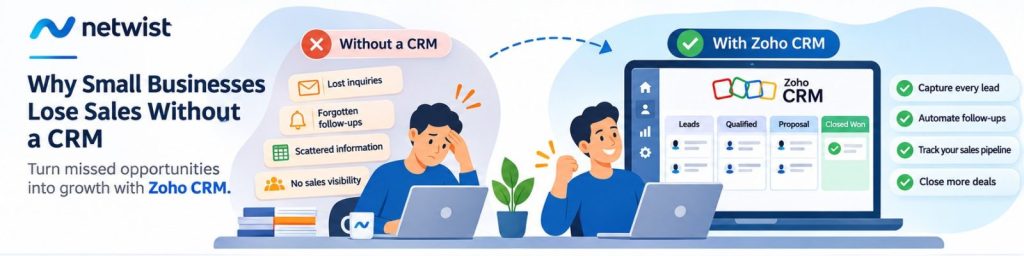
Every missed follow-up, forgotten customer inquiry, and untracked sales opportunity can cost your business money. Discover why small businesses struggle to manage sales without a CRM and how Zoho CRM can help turn missed opportunities into sustainable growth.
The Hidden Sales Problem Most Small Businesses Don’t Realize They Have
Running a small business means managing multiple responsibilities simultaneously.
You respond to customer emails, answer phone calls, prepare quotations, attend meetings, manage projects, and try to find new customers — often all in the same day.
As your business grows, keeping track of every potential customer becomes increasingly difficult.
A new inquiry arrives through your website. Another customer calls requesting a quotation. Someone sends a message through social media, while an existing client asks about an additional service.
Initially, everything seems manageable.
But then something happens.
You forget to follow up with a potential customer. A quotation remains unanswered. An important conversation gets buried in your inbox.
And a promising sales opportunity disappears.
The problem isn’t necessarily your product, pricing, or sales skills.
The problem is the absence of a structured system for managing customer relationships and sales opportunities.
This is where Customer Relationship Management (CRM) software becomes essential.
What Is a CRM and Why Does Your Small Business Need One?
A Customer Relationship Management system, commonly known as a CRM, is software designed to organize customer information, track interactions, manage sales opportunities, and streamline communication.
Instead of storing information across spreadsheets, email accounts, notebooks, and employees’ memories, a CRM creates a centralized environment where your business can manage its relationships with potential and existing customers.
With a CRM, your team can:
- Store customer and prospect information in one place.
- Track every stage of the sales process.
- Schedule follow-ups and important activities.
- Monitor quotations and open opportunities.
- Automate repetitive administrative tasks.
- Improve communication between employees.
- Analyze sales performance and identify areas for improvement.
For small businesses, the biggest advantage isn’t simply better organization.
It’s the ability to create a repeatable, measurable sales process that doesn’t depend entirely on individual employees remembering what needs to happen next.
7 Reasons Small Businesses Lose Sales Without a CRM
1. Customer Inquiries Get Lost Across Different Channels
Imagine a business receiving inquiries through its website, email, phone, and social media accounts.
Without a centralized system, these inquiries may be handled by different employees using different tools.
One potential customer might receive an immediate response, while another inquiry remains unanswered for several days.
This inconsistency can damage the customer experience and reduce the likelihood of converting inquiries into sales.
How Zoho CRM helps
Zoho CRM allows businesses to organize leads and customer records in a centralized database.
Website forms, supported communication channels, and integrated applications can help capture inquiries and associate them with the appropriate customer records.
For example, a visitor completing a contact form on your website can automatically create a lead in Zoho CRM.
The responsible salesperson can then receive a notification and begin the follow-up process.
Instead of relying on someone to manually copy information from an email, the inquiry becomes part of an organized sales workflow.
2. Sales Follow-Ups Are Forgotten
Following up with potential customers is one of the most important activities in sales.
Yet it is also one of the easiest tasks to forget.
Consider a potential customer who requests a quotation on Monday.
You send the proposal on Tuesday, but the customer doesn’t respond immediately.
By Friday, you’ve received several new inquiries, attended meetings, and handled numerous other responsibilities.
The original quotation is no longer at the top of your mind.
Without a reminder, you may never contact that customer again.
How Zoho CRM helps
Zoho CRM enables users to schedule tasks, calls, meetings, and follow-up reminders.
Businesses can also configure workflow automation to create tasks or send notifications when predefined conditions are met.
For example:
- Day 1: A customer requests a quotation.
- Day 2: The salesperson sends the proposal.
- Day 5: Zoho CRM reminds the salesperson to follow up.
- Day 10: The opportunity is reviewed if no response has been received.
The precise workflow can be customized to match your business processes.
This helps ensure that valuable opportunities are not forgotten simply because employees are busy.
3. Customer Information Is Scattered Across Spreadsheets and Emails
Many small businesses begin managing customers using Excel spreadsheets.
At first, this approach may work.
But as the number of customers increases, maintaining accurate information becomes more difficult.
One employee updates a spreadsheet while another keeps customer notes in their email account.
A third employee may maintain a separate contact list.
Eventually, the business ends up with multiple versions of the same information.
This creates confusion, duplicate records, and unnecessary administrative work.
How Zoho CRM helps
Zoho CRM provides a central location for managing customer records, contact details, sales activities, notes, and opportunities.
Authorized employees can access relevant information according to their assigned permissions.
When properly configured, this creates a more consistent view of each customer relationship.
Instead of asking colleagues for the latest information, employees can review the relevant CRM record.
4. Businesses Cannot Clearly See Their Sales Pipeline
Ask a small business owner a simple question:
How many sales opportunities are you currently working on, and what is their potential value?
Without a CRM, answering accurately may require checking spreadsheets, emails, and conversations with employees.
This lack of visibility makes planning difficult.
Businesses may struggle to identify which opportunities are close to closing, which require attention, and where potential customers are getting stuck.
How Zoho CRM helps
Zoho CRM includes sales pipeline management capabilities that allow businesses to organize opportunities into stages.
A typical pipeline might look like this:
New Inquiry → Qualified Lead → Proposal Sent → Negotiation → Closed Won / Closed Lost
Each opportunity can include relevant information such as its potential value, expected closing date, assigned owner, and current stage.
Managers can review the pipeline to understand what is happening across the sales process.
For example, if a business has 20 open opportunities but most remain in the proposal stage, this may indicate that the quotation or follow-up process needs improvement.
A CRM makes these patterns easier to identify.
5. Sales Teams Spend Too Much Time on Repetitive Tasks
Sales employees should spend their time building relationships, understanding customer needs, and closing opportunities.
However, many small businesses spend considerable time on administrative activities.
These might include copying contact information, updating spreadsheets, sending routine notifications, assigning inquiries, and preparing status reports.
Individually, these tasks may seem insignificant.
Collectively, they can consume valuable working hours.
How Zoho CRM helps
Zoho CRM provides workflow automation tools that can reduce repetitive administrative work.
Depending on the configuration and subscription plan, businesses can automate activities such as lead assignment, task creation, internal notifications, and selected customer communications.
For example, when a new lead arrives from a website form, Zoho CRM can automatically assign it to a salesperson and create a follow-up task.
The employee can then focus on contacting the prospect instead of manually organizing the inquiry.
6. Customer Relationships Depend Too Much on Individual Employees
In many small businesses, important customer information exists primarily in the memory or personal inbox of one employee.
This creates operational risk.
What happens when that employee is on holiday, changes responsibilities, or leaves the company?
Other team members may struggle to understand previous conversations, pending quotations, or customer requirements.
As a result, service quality can become inconsistent.
How Zoho CRM helps
A CRM helps businesses maintain organizational knowledge through shared customer records and documented activities.
When an employee is unavailable, another authorized team member can review the relevant information and continue the conversation.
This improves business continuity and reduces dependency on individual employees.
It also helps businesses provide a more consistent customer experience as their teams grow.
7. Business Owners Make Decisions Without Reliable Sales Data
Without structured reporting, business decisions often depend on assumptions.
A business owner might believe that most leads come from referrals, when website inquiries actually generate more qualified opportunities.
Another company might invest heavily in advertising without knowing how many inquiries become paying customers.
Without reliable data, it becomes difficult to determine which activities generate results.
How Zoho CRM helps
Zoho CRM offers reporting and dashboard capabilities that help businesses monitor sales activity and performance.
Depending on the available data and configuration, companies can analyze:
- Leads generated by different channels.
- Opportunities at each sales stage.
- Sales performance by employee or team.
- Conversion rates.
- Revenue associated with closed deals.
- Open opportunities and expected sales.
These insights support more informed decisions about sales processes, marketing investments, and resource allocation.
A Practical Example: How a Small Business Can Transform Its Sales Process
Consider a small IT services company receiving approximately 50 inquiries every month.
The company offers website development, technical support, and business software solutions.
Before implementing a CRM, the team manages inquiries through email and spreadsheets.
Some inquiries receive immediate attention, while others are delayed or forgotten.
To illustrate the potential impact, imagine the following hypothetical scenario.
Before Implementing a CRM
- 50 new inquiries per month.
- 10 inquiries receive no meaningful follow-up.
- 40 inquiries are actively handled.
- 20% of handled inquiries become customers.
- 8 new customers per month.
After Implementing a Structured CRM Process
The company introduces Zoho CRM, centralizes incoming inquiries, and establishes follow-up reminders.
Assume the company now handles all 50 inquiries while maintaining the same 20% conversion rate.
The result would be:
- 50 new inquiries per month.
- 50 inquiries actively handled.
- 20% conversion rate.
- 10 new customers per month.
That’s 2 additional customers per month, or 24 additional customers over a year, without increasing the number of incoming inquiries.
If the average initial sale were €1,000, the illustrative difference would be €24,000 in additional annual sales.
These figures are hypothetical and do not represent guaranteed results or measured performance improvements from Zoho CRM.
They demonstrate an important business principle:
Improving how existing opportunities are managed can create additional revenue without necessarily increasing marketing expenditure.
Why Zoho CRM Is a Smart Choice for Small and Growing Businesses
There are many CRM solutions available, but Zoho CRM offers several capabilities that make it worth considering for small and medium-sized businesses.
Flexible and Scalable
Zoho CRM offers different editions and features that support organizations with varying requirements.
A business can begin with relatively straightforward customer and lead management and introduce more advanced workflows as its needs evolve.
Customizable Sales Processes
Every business sells differently.
A consulting company, an IT services provider, and a hospitality business may all require different sales stages and customer information.
Zoho CRM allows businesses to configure fields, layouts, pipelines, and workflows to support their processes.
Integration with Business Applications
Zoho CRM can connect with other applications within the Zoho ecosystem and supported third-party services.
Depending on the products, plans, and integrations used, businesses can connect CRM processes with:
- Zoho Mail: Business email and customer communication.
- Zoho Campaigns: Email marketing and audience segmentation.
- Zoho Desk: Customer support and ticket management.
- Zoho Books: Invoicing and financial workflows.
- Zoho Forms: Lead capture and data collection.
- Zoho Flow: Workflow integrations between applications.
- Zoho Analytics: Advanced reporting and business intelligence.
This integrated approach can help businesses reduce disconnected processes and improve the flow of information between departments.
Automation Without Unnecessary Complexity
Many businesses assume automation requires large IT teams or expensive custom software.
Zoho CRM provides configurable tools for implementing common sales automation scenarios.
However, effective automation still requires proper planning.
A poorly designed workflow can create confusion rather than improve efficiency.
That’s why defining the right processes before implementing automation is essential.
Connecting Your Website with Zoho CRM: From Visitor to Customer
A professional website should do more than present your products and services.
It should help your business generate and manage sales opportunities.
Consider a typical visitor journey.
Step 1: A visitor discovers your website
A potential customer finds your business through Google Search, social media, or a recommendation.
Step 2: The visitor submits an inquiry
They complete a contact form requesting information about a product or service.
Step 3: The inquiry enters Zoho CRM
With the appropriate integration, the submitted information creates or updates a CRM record.
Step 4: The inquiry is assigned to the right employee
A configured workflow can notify the appropriate salesperson and create a follow-up task.
Step 5: The sales opportunity is tracked
The salesperson contacts the prospect, records relevant information, prepares a quotation, and updates the opportunity.
Step 6: The business measures the outcome
Management can review the sales pipeline and assess how inquiries progress toward completed sales.
This process transforms a website from a standalone marketing channel into part of a connected sales operation.
For businesses investing in website development and digital marketing, this integration can be particularly valuable.
Why CRM Implementation Matters as Much as the Software
Purchasing CRM software is only the first step.
The real value comes from configuring it to support the way your business operates.
Before implementing a CRM, businesses should define:
- Where leads originate.
- What information needs to be collected.
- Who is responsible for each inquiry.
- Which stages make up the sales process.
- When follow-ups should take place.
- Which tasks can be automated.
- What information managers need to monitor.
- How employees will be trained to use the system.
Without clear processes, even sophisticated software can become an expensive contact database.
A successful CRM implementation combines technology, business analysis, process design, and employee adoption.
How Netwist Can Help Your Business Get More Value from Zoho CRM
At Netwist, we understand that technology should solve real business problems.
Our focus is on helping businesses improve their digital operations through practical technology solutions, business applications, website development, and connected workflows.
For companies exploring Zoho CRM, the starting point should be understanding how inquiries are currently received, managed, and converted into customers.
From there, a CRM project can be designed around the organization’s actual requirements.
Potential areas of implementation include:
CRM Planning and Configuration
Defining customer records, sales stages, responsibilities, and workflows that match your business processes.
Website and Lead Capture Integration
Connecting website inquiries and supported lead-generation tools with Zoho CRM to improve the management of new opportunities.
Sales Process Automation
Configuring reminders, lead assignments, notifications, and workflows to reduce repetitive administrative tasks.
Zoho Application Integration
Exploring connections between Zoho CRM and relevant business applications, including Zoho Mail, Zoho Campaigns, Zoho Desk, and other supported tools.
Ongoing Optimization
Reviewing how the system is used and identifying opportunities to improve data quality, reporting, and team adoption.
The objective isn’t simply to introduce another software platform.
It’s to help your business create a more organized and measurable approach to managing customer relationships.
How to Know If Your Business Needs a CRM
Not every business needs a complex CRM implementation immediately.
However, there are clear warning signs that your existing approach may no longer be sufficient.
You should consider adopting a CRM if:
- Customer inquiries are managed through multiple disconnected channels.
- Your team frequently forgets to follow up on quotations.
- Customer information is scattered across spreadsheets and inboxes.
- You cannot easily identify the value of your current sales pipeline.
- Multiple employees communicate with the same customers.
- You struggle to measure where your best leads originate.
- Your business is growing and manual processes are becoming difficult to manage.
If several of these situations sound familiar, a CRM may help your business establish more reliable sales processes.
Frequently Asked Questions About CRM for Small Businesses
What does CRM stand for?
CRM stands for Customer Relationship Management. It refers to the processes and software businesses use to manage interactions with potential and existing customers.
Is CRM software worth it for a small business?
A CRM can be valuable for small businesses that manage multiple customer inquiries, quotations, or ongoing sales opportunities. Its value depends on the complexity of the business, the quality of implementation, and how consistently employees use it.
Can Zoho CRM help prevent missed sales opportunities?
Zoho CRM can help reduce missed opportunities by centralizing lead information, organizing sales pipelines, and supporting reminders and workflow automation. It cannot guarantee that every lead will convert into a customer.
Can Zoho CRM integrate with my website?
Yes. Zoho CRM supports lead capture and integration options for websites and external applications. The appropriate approach depends on the website platform, available integrations, and business requirements.
Is Zoho CRM suitable for businesses that currently use Excel?
Yes. Businesses managing customers in spreadsheets can evaluate Zoho CRM as a more structured alternative. Data preparation, duplicate management, and proper import configuration are important during migration.
Can Zoho CRM integrate with Zoho Mail?
Yes. Zoho CRM supports email integration capabilities, including connections with Zoho Mail. Available functionality depends on the selected plans and configuration.
How long does it take to implement Zoho CRM?
Implementation time varies according to the number of users, existing data, required customizations, integrations, and workflow complexity. A simple configuration may require relatively little time, while more extensive implementations can take considerably longer.
Conclusion: Stop Losing Sales Because of Disorganized Processes
Small businesses rarely lose sales for just one reason.
Sometimes the problem is slow communication. Sometimes it’s a forgotten follow-up, incomplete customer information, or a lack of visibility into the sales pipeline.
Individually, these issues may seem minor.
Together, they can prevent a business from achieving its full sales potential.
A well-implemented CRM helps address these challenges by organizing customer information, creating structured sales processes, and improving collaboration.
Zoho CRM offers small and growing businesses a flexible platform for managing leads, tracking opportunities, automating selected tasks, and gaining better visibility into sales performance.
But technology alone isn’t the answer.
The real opportunity comes from combining the right software with well-designed processes and a clear understanding of your business needs.
Because growing your business isn’t only about finding more customers. It’s also about making the most of the opportunities you already have.
Ready to Stop Missing Sales Opportunities?
Turn your customer inquiries into a more organized sales process with Zoho CRM.
Whether you’re currently managing leads through spreadsheets, struggling with missed follow-ups, or looking to connect your website with your sales operations, Netwist can help you explore a CRM solution that fits your business.
Let’s discuss how Zoho CRM can support your sales process, improve visibility, and help your team work more efficiently.
Request a Consultation with Netwist
Discover how better CRM processes can help your business grow with confidence.