

In today’s digital business environment, effective customer communication is one of the most important drivers of sustainable growth. Attracting new customers, retaining existing ones, and building long-term relationships require strategy, consistency, organization, and the right technology.
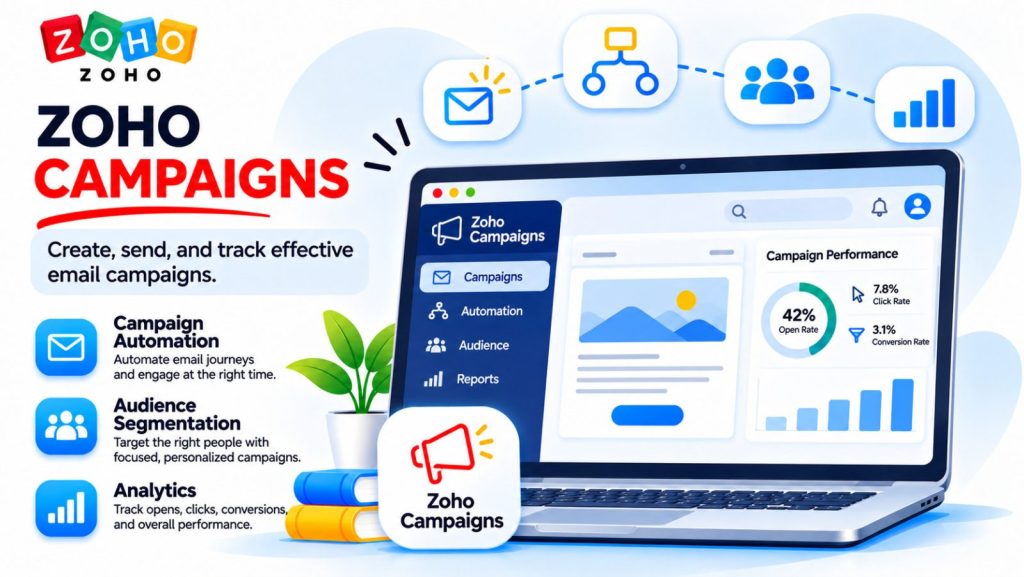
Zoho Campaigns is a comprehensive email marketing platform that enables businesses to create professional newsletters, organize their audiences, deliver personalized campaigns, automate customer communication, and measure marketing performance.
Combined with Zoho CRM and other applications within the Zoho ecosystem, it can become a powerful tool for connecting marketing activities with sales processes and broader business growth objectives.
In this comprehensive guide, we will explore what Zoho Campaigns is, its key features, business benefits, practical applications, and how to configure and use it effectively.
1. What Is Zoho Campaigns?
Zoho Campaigns is a cloud-based marketing application developed by Zoho, designed to create, deliver, automate, and monitor marketing campaigns.
Unlike traditional email applications such as Gmail, Microsoft Outlook, or Zoho Mail, Zoho Campaigns is specifically designed for structured communication with larger audiences.
It is more than a bulk email sending tool. It is a marketing platform that helps businesses understand their audiences, create targeted communication strategies, and use campaign performance data to improve future marketing activities.
Its core capabilities include:
- Professional newsletter creation and distribution.
- Contact and subscriber management.
- Audience segmentation.
- Email personalization.
- Automated marketing campaigns.
- Signup form creation.
- A/B testing.
- Campaign scheduling.
- Marketing reports and analytics.
- Integration with CRM systems, eCommerce platforms, and other applications.
- AI-powered content creation assistance.
The platform also extends into multichannel marketing, with SMS and WhatsApp marketing capabilities depending on subscription plans, geographical availability, and additional service requirements.
2. Why Email Marketing Remains Essential for Businesses
Despite the rapid growth of social media, digital advertising, and artificial intelligence, email marketing remains an important channel for direct customer communication.
On social media platforms, content visibility is influenced by algorithms, platform policies, and advertising budgets.
With a properly managed subscriber database, however, businesses gain greater control over how they communicate with their audiences, provided they have the appropriate legal permission to do so.
Email marketing allows businesses to:
- Introduce new products and services.
- Promote special offers.
- Share valuable articles and educational content.
- Strengthen brand awareness.
- Re-engage inactive customers.
- Nurture potential customers.
- Generate new sales opportunities.
- Maintain customer relationships after a purchase.
- Encourage repeat business.
- Drive qualified traffic to their websites.
However, the true value of email marketing is not determined by the number of messages sent. It is determined by the relevance and value of those messages to their recipients.
Delivering the right message to the right person at the right time is the foundation of an effective email marketing strategy.
3. Who Should Use Zoho Campaigns?
Zoho Campaigns can support businesses of different sizes across a wide range of industries.
| Industry | Example Applications |
|---|---|
| Small and medium-sized businesses | Newsletters and service promotions |
| eCommerce businesses | Product launches, offers, and shopping reminders |
| Hotels and hospitality businesses | Seasonal promotions and guest communication |
| B2B companies | Lead nurturing and sales development |
| Consulting firms | Service promotion and educational content |
| Educational organizations | Course announcements and webinar invitations |
| Real estate agencies | Targeted property listings |
| Technology companies | Product updates and customer education |
| Retail businesses | Promotional campaigns and repeat purchases |
| Associations and organizations | Member communication and event announcements |
Regardless of industry, successful implementation requires a clear communication strategy, reliable customer data, and measurable business objectives.
4. Key Features and Capabilities of Zoho Campaigns
Professional Newsletter Creation with a Drag-and-Drop Editor
Zoho Campaigns provides a visual email editor that enables users to create professional marketing emails without requiring programming knowledge.
The editor allows you to add:
- Text and headings.
- Images and branded graphics.
- Call-to-action buttons.
- Product and service links.
- Social media icons.
- Multiple columns and content layouts.
- Personalized recipient information.
- Company details and contact information.
You can choose from available email templates or create custom designs that reflect your company’s visual identity.
Responsive email layouts help ensure that newsletters display appropriately across desktops, tablets, and smartphones.
However, email rendering can vary between email clients. Every campaign should therefore be tested before distribution.
Contact and Subscriber Management
Your contact database is the foundation of your email marketing activities.
Zoho Campaigns allows you to organize contacts into mailing lists, create custom fields, and manage information related to subscriber characteristics and communication preferences.
For example, a business may maintain information such as:
- First and last name.
- Email address.
- Company name.
- Industry.
- Country or region.
- Preferred language.
- Product or service interests.
- Subscription status.
Contact information should always be collected and processed for clearly defined purposes and in accordance with applicable data protection regulations.
Audience Segmentation
One of the most common email marketing mistakes is sending the same message to every contact in a database.
Not every customer has the same interests, requirements, purchasing behavior, or level of familiarity with your business.
Audience segmentation enables you to create targeted groups based on specific criteria.
| Audience Segment | Campaign Content |
|---|---|
| New subscribers | Welcome emails |
| Existing customers | Product updates and new services |
| Potential customers | Solutions and business benefits |
| Inactive subscribers | Re-engagement campaigns |
| Greek-speaking customers | Greek-language newsletters |
| International customers | English-language newsletters |
| CRM prospects | CRM-related educational content |
Available segmentation criteria depend on your contact data, connected applications, and subscription plan.
Effective segmentation helps businesses deliver more relevant messages while reducing unnecessary communication.
Email Personalization
Zoho Campaigns enables businesses to use contact information to create personalized marketing messages.
Through Merge Tags, you can automatically insert information such as the recipient’s name or company name.
Instead of sending a generic message:
“Dear customer, we would like to introduce our services.”
You could create a more personalized message:
“Hello John, discover how your business can organize its sales processes more effectively.”
However, meaningful personalization goes beyond simply inserting a recipient’s first name.
It involves delivering content that reflects the recipient’s interests, requirements, and stage in the customer journey.
Dynamic Email Content
With supported subscription plans, Zoho Campaigns allows different sections of an email to display different content depending on recipient characteristics.
For example, a digital solutions provider could create a single newsletter in which:
- Hospitality businesses receive information about hotel technology solutions.
- Online retailers receive information about eCommerce solutions.
- B2B companies receive information about CRM and sales automation.
This approach can reduce the need to create separate newsletters for every audience segment while improving content relevance.
A/B Testing
A/B testing enables marketers to compare different versions of an email campaign.
Depending on the available configuration options, you can test different subject lines, sender names, or email content.
For example:
Subject Line A: Discover the Benefits of Zoho CRM
Subject Line B: How to Organize Your Sales Processes More Effectively
By comparing campaign performance, you can identify which approach generates a stronger response from your audience.
For more reliable results, test one variable at a time and use an adequately sized audience sample.
Campaign Scheduling and Send-Time Optimization
Email campaigns do not need to be distributed immediately after creation.
Zoho Campaigns allows businesses to schedule campaigns for specific dates and times.
Depending on the subscription plan, additional capabilities may include:
- Time-zone-based delivery.
- Batch sending.
- Send-time optimization.
There is no universally ideal time to send a newsletter. The best sending schedule should be determined through testing, performance data, and an understanding of your particular audience.
5. Marketing Automation: Automating Customer Communication
One of the most valuable capabilities of Zoho Campaigns is its ability to automate email marketing through Workflows.
Instead of manually creating and sending every individual message, businesses can design automated processes that activate when specific events occur or predefined conditions are met.
A workflow can include:
- Triggers.
- Waiting periods.
- Conditions and decision points.
- Alternative communication paths.
- Automated actions.
Example 1: Automated Welcome Email Series
When a website visitor subscribes to your newsletter, an automated welcome sequence can begin.
| Timing | Automated Action |
|---|---|
| Immediately after subscription confirmation | Send a welcome email |
| After 3 days | Introduce the company and its services |
| After 7 days | Share a useful article or educational guide |
| After 14 days | Invite the subscriber to contact the business or request a consultation |
The business creates the workflow once, and Zoho Campaigns executes the sequence for each eligible new subscriber.
Example 2: Lead Nurturing for B2B Businesses
Not every potential customer is ready to purchase immediately after discovering your business.
Lead nurturing is the process of gradually developing a prospect’s interest through relevant and valuable communication.
A company offering CRM solutions could create the following automated sequence:
- Introduce the benefits of a CRM system.
- Explain common business challenges that CRM can solve.
- Share practical implementation examples.
- Introduce relevant products and services.
- Invite the prospect to request a demonstration or consultation.
The communication sequence can adapt according to recipient interactions and the available workflow capabilities.
Example 3: Re-Engaging Inactive Subscribers
Businesses can create targeted campaigns for subscribers who have not interacted with their content for an extended period.
A re-engagement campaign could include:
- New or particularly valuable content.
- An invitation to update communication preferences.
- A relevant special offer.
- An easy way to unsubscribe.
Re-engagement campaigns should be used responsibly. Repeatedly contacting uninterested subscribers can negatively affect sender reputation and email deliverability.
Example 4: eCommerce Marketing Automation
With appropriate eCommerce integrations and subscription capabilities, businesses can implement automated campaigns such as:
- Abandoned cart reminders.
- Complementary product recommendations.
- Post-purchase communication.
- Customer re-engagement.
- Product recommendations based on available customer data.
These workflows must respect customer communication permissions, subscription preferences, and applicable marketing regulations.
6. Zoho Campaigns and Zoho CRM Integration
Integration with Zoho CRM is one of the most significant advantages of Zoho Campaigns, particularly for businesses already using the Zoho ecosystem.
Zoho CRM manages customer relationships, leads, sales opportunities, and commercial activities.
Zoho Campaigns manages structured marketing communication.
Together, these applications help businesses connect marketing activities with their sales processes.
How Do Zoho Campaigns and Zoho CRM Work Together?
With appropriate configuration, businesses can:
- Synchronize selected contacts and leads.
- Use CRM information to create targeted campaigns.
- Map custom fields between applications.
- Access available campaign engagement information.
- Provide sales teams with additional customer insights.
- Trigger supported CRM actions through automation.
A Practical Business Example
Imagine that a website visitor is interested in implementing a CRM solution and completes an inquiry form.
The process could work as follows:
- The visitor’s information is recorded in Zoho CRM as a Lead.
- Marketing communication permission is recorded separately.
- If eligible, the contact is synchronized with Zoho Campaigns.
- An automated lead nurturing workflow is activated.
- The prospect receives educational content related to their interests.
- If the prospect demonstrates further interest, an appropriate follow-up action can be initiated for the sales team.
This approach ensures that marketing does not operate independently from sales but becomes part of an integrated business process.
Important: The existence of a contact in Zoho CRM does not automatically authorize the business to send promotional emails to that individual.
7. Integrating Zoho Campaigns with Your Business Website
A professional business website should do more than simply present information about your company.
It can also serve as a central platform for attracting potential customers, collecting inquiries, and developing long-term relationships.
Zoho Campaigns can become part of a broader digital strategy that includes:
- WordPress business websites.
- Newsletter subscription forms.
- Landing pages.
- Lead generation forms.
- Webinar registration pages.
- Promotional campaigns.
- eCommerce websites.
Depending on the project requirements, integration can be implemented through embedded forms, supported plugins, Zoho Forms, Zoho Flow, or appropriate API integrations.
From Website Visitor to Customer
An integrated customer journey could follow this process:
Website Visit → Newsletter Subscription → Marketing Permission → Automated Communication → Expression of Interest → Sales Follow-Up → Customer Relationship Development
The greatest business value emerges when your website, CRM system, and email marketing platform operate as a connected digital environment.
8. How to Use Zoho Campaigns: A Step-by-Step Guide
The following guide explains how to configure Zoho Campaigns and prepare your first professional email marketing campaign.
Step 1: Create Your Zoho Campaigns Account
Visit the official Zoho Campaigns website and create an account or sign in using your existing Zoho credentials.
During the initial configuration, provide your organization details, including:
- Company name.
- Business website.
- Country and time zone.
- Physical business address.
- Contact information.
- Users and access permissions.
Proper initial configuration establishes the foundation for reliable campaign management.
Step 2: Add and Verify Your Sender Email Address
Navigate to the sender management section within the application settings.
Add the professional email address you intend to use for campaign distribution.
For example:
Complete the verification process requested by Zoho and configure the sender name that recipients will see.
Use a recognizable business name and a genuine email address where customer replies can be monitored and managed.
Step 3: Authenticate Your Business Domain
Domain authentication is one of the most important technical steps when configuring an email marketing platform.
Three essential email authentication mechanisms should be considered:
| Authentication Mechanism | Purpose |
|---|---|
| SPF | Identifies services authorized to send emails on behalf of your domain |
| DKIM | Adds a digital signature that helps verify message authenticity |
| DMARC | Defines authentication policies and helps protect your domain against spoofing |
The domain authentication process generally involves the following steps:
- Locate Domain Authentication within Zoho Campaigns settings.
- Select the domain you want to authenticate.
- Copy the DNS records provided by Zoho Campaigns.
- Sign in to your domain’s DNS management platform.
- Add or update the required DNS records.
- Allow time for DNS changes to propagate.
- Return to Zoho Campaigns and complete verification.
Important: Do not copy random SPF or DKIM records from unrelated online tutorials.
The correct values may vary depending on your domain, Zoho data center, and existing email infrastructure.
A domain must not have multiple separate SPF records. If several authorized sending services are used, their SPF mechanisms must be consolidated appropriately.
Incorrect DNS modifications can affect your company’s existing email services. For this reason, domain authentication should ideally be handled by an experienced technical professional.
Step 4: Create Your Mailing Lists
Navigate to the Contacts section and organize your contacts according to your business requirements.
Example mailing lists include:
- Newsletter Subscribers.
- Existing Customers.
- Business Leads.
- Event Subscribers.
- Greek Audience.
- International Audience.
Avoid creating unnecessary lists that make contact management more complicated.
Instead, combine mailing lists with custom fields, segments, subscription topics, and tags where supported.
Step 5: Import Your Contacts
Contacts can be added to Zoho Campaigns through several methods:
- Manual contact creation.
- Supported CSV or Excel file imports.
- Zoho CRM synchronization.
- Website subscription forms.
- Supported third-party integrations.
A basic contact import file might contain the following columns:
| First Name | Company | Language | |
|---|---|---|---|
| [email protected] | Maria | Example Company | Greek |
| [email protected] | John | Example Business | English |
During the import process, map your fields correctly and verify each contact’s subscription status.
An existing customer database should never automatically be treated as a database of authorized marketing subscribers.
Step 6: Configure Subscription Topics
Topics help businesses organize subscriber communication preferences.
For example, your company could offer the following subscription topics:
- Company News.
- Educational Resources.
- Special Offers.
- Product and Service Updates.
- Events and Webinars.
This enables subscribers to manage the types of content they wish to receive.
Topics and Segments serve different purposes.
Topics relate to subscription preferences, while Segments allow businesses to create targeted audiences based on contact information and specific criteria.
Step 7: Create a Newsletter Signup Form
Navigate to the Signup Forms section and create a subscription form for your website.
The form should be simple, transparent, and request only the information genuinely required.
For example:
Subscribe to Our Newsletter
Receive business insights, useful articles, company updates, and information about our services.
Suggested form fields:
- First name.
- Email address.
- Marketing consent option, where required.
- Link to the privacy policy.
Consider enabling Double Opt-in so that subscribers confirm their registration through a verification email.
Once the form has been created, integrate it into your website using a supported method and test the entire subscription process.
Step 8: Create Your First Email Campaign
Navigate to the email campaigns section and select the option to create a new campaign.
Configure the essential campaign information.
| Field | Description |
|---|---|
| Campaign Name | Internal campaign identification |
| Subject | Email subject line |
| Sender Name | Name displayed to recipients |
| Sender Email | Verified sending address |
| Reply-to Address | Address used for recipient replies |
| Preheader | Supporting preview text |
| Recipients | Eligible mailing list or audience segment |
| Topic | Relevant subscription topic, where required |
The subject line and preheader should complement each other and clearly communicate the value of the message.
For example:
Subject: 5 Ways to Organize Your Sales Processes More Effectively
Preheader: Discover how a modern CRM system can simplify your daily business operations.
Step 9: Design Your Newsletter
Select an available template or create a custom layout using the Drag-and-Drop Editor.
An effective professional newsletter can include:
- Company logo.
- Main image or illustration.
- Clear and engaging headline.
- Short introduction.
- Main content.
- Primary call to action.
- Contact information.
- Required company details.
- Subscription management or unsubscribe link.
Avoid excessive imagery, unnecessarily long paragraphs, and too many competing calls to action.
Every campaign should have a clearly defined primary objective.
Step 10: Select the Appropriate Audience
Choose the mailing lists or segments most relevant to your campaign.
Before proceeding, verify that:
- Recipients are eligible to receive the communication.
- The correct language has been selected.
- Subscription preferences match the campaign content.
- Unsubscribed contacts are excluded.
- Irrelevant or inappropriate audience segments have been removed.
Audience quality is more important than audience size.
Step 11: Preview and Test Your Campaign
Never distribute an email campaign without testing it first.
Use the preview and test email capabilities to review:
- Spelling and grammar.
- Mobile and desktop appearance.
- Link functionality.
- Image and logo rendering.
- Merge Tag accuracy.
- Sender information.
- Call-to-action buttons.
- Unsubscribe functionality.
- The destination landing page.
Spending additional time on quality assurance is preferable to distributing an incorrect campaign to thousands of recipients.
Step 12: Schedule or Send Your Campaign
Once all checks and any required platform review processes have been completed, you can send or schedule your campaign.
Depending on the available features, you may be able to select a specific sending time, time zone, or alternative scheduling method.
After distribution, monitor campaign performance through the Reports section.
The exact names and locations of application settings may vary depending on the Zoho Campaigns version, user permissions, and subscription plan.
9. How to Create an Automated Workflow in Zoho Campaigns
Once you are familiar with standard email campaigns, you can begin implementing marketing automation.
Navigate to the Automation or Workflows section and create a new workflow using an available template or a custom process.
A basic welcome workflow could include:
- Trigger: An eligible contact joins a specific list or completes a confirmed subscription.
- Action: Send a welcome email.
- Wait: Pause for three days.
- Action: Send educational content.
- Wait: Pause for four additional days.
- Condition: Check an available engagement indicator, such as interaction with a specific link.
- Action: Send a relevant follow-up email or complete the workflow.
Before activating the workflow, review:
- Entry conditions.
- Exit conditions.
- Subscription and unsubscribe handling.
- Contact eligibility.
- Re-entry rules.
- Communication frequency.
- Potential conflicts with other automated campaigns.
The purpose of automation is to improve customer communication, not to increase email volume without control.
10. Campaign Reports and Analytics: Measuring Email Marketing Performance
Zoho Campaigns provides reporting capabilities that help businesses evaluate the effectiveness of their marketing activities.
Analyzing campaign results is essential for understanding what works, what does not, and where improvements are needed.
Essential Email Marketing KPIs
| KPI | What It Measures |
|---|---|
| Delivery Rate | Percentage of messages accepted by recipient mail servers |
| Open Rate | Recorded percentage of recipients who opened an email |
| Click-Through Rate (CTR) | Percentage of recipients who clicked a link |
| Click-to-Open Rate (CTOR) | Recorded clicks relative to recorded opens |
| Bounce Rate | Percentage of messages that could not be delivered |
| Unsubscribe Rate | Percentage of recipients who unsubscribed |
| Spam Complaints | Reports of unwanted or unsolicited messages |
| Conversion Rate | Percentage completing a desired action |
| ROI | Return on investment relative to campaign costs |
A message accepted by a recipient’s email server does not necessarily appear in their primary inbox.
Privacy technologies such as Apple Mail Privacy Protection can also affect the reliability of open rates.
Similarly, automated security systems may generate recorded link clicks without genuine human engagement.
For this reason, businesses should evaluate multiple performance indicators and prioritize measurable business outcomes.
Example: Evaluating an Email Marketing Campaign
Imagine that a business distributes a newsletter to 2,000 recipients.
| Result | Number | Percentage |
|---|---|---|
| Emails sent | 2,000 | 100% |
| Emails delivered | 1,960 | 98% |
| Recorded unique opens | 784 | 40% |
| Unique recipients who clicked | 98 | 5% |
| Contact inquiries | 12 | 0.61% |
| New customers | 3 | 0.15% |
Open, click, inquiry, and customer conversion percentages are calculated using delivered emails as the denominator.
In this example, the business value of the campaign extends beyond the 784 recorded opens or 98 clicks.
The 12 inquiries and three new customers represent more meaningful indicators of commercial performance.
These figures are hypothetical and do not represent guaranteed or expected campaign results.
How to Calculate Email Marketing ROI
A useful profitability-based formula is:
ROI = [(Incremental Gross Profit Generated by the Campaign − Total Campaign Cost) / Total Campaign Cost] × 100
For example, if an email marketing campaign generates €1,500 in attributable incremental gross profit and costs €300 to implement, its ROI is 400%.
Campaign costs should include relevant expenses such as:
- Software subscriptions.
- Email design.
- Content creation.
- Technical implementation.
- Marketing management.
- Staff time.
For more accurate evaluation, businesses can combine campaign reporting with CRM, eCommerce, and website analytics data.
11. Zoho Campaigns and Google Analytics
Campaign performance measurement should not end when a recipient clicks an email link.
Using UTM parameters and properly configured analytics tools such as Google Analytics 4, businesses can evaluate what happens after visitors reach their websites, subject to applicable privacy and consent requirements.
An example UTM configuration might include:
- utm_source: zoho_campaigns
- utm_medium: email
- utm_campaign: crm_newsletter
This enables businesses to analyze:
- Website visits generated by specific newsletters.
- Pages visited by email recipients.
- Contact form submissions.
- Product purchases.
- Other relevant conversion events.
Accurate conversion tracking requires appropriate website configuration, analytics implementation, and consent management.
12. Artificial Intelligence and Zoho Campaigns
Artificial intelligence is becoming an increasingly important part of email marketing.
Through supported AI-powered capabilities, Zoho Campaigns can assist marketing professionals with activities such as:
- Creating initial content drafts.
- Generating subject line suggestions.
- Improving writing style and messaging.
- Supporting personalization.
- Optimizing campaign delivery times.
Feature availability depends on the application version, account settings, and subscription plan.
However, artificial intelligence cannot replace business strategy.
An effective newsletter is not created simply by entering prompts into an AI tool. It requires audience understanding, reliable data, brand consistency, commercial objectives, and professional review.
The difference between an experienced marketing professional and someone who simply generates content using AI lies in their ability to understand the business context, evaluate the output, and take responsibility for the final result.
Artificial intelligence is a powerful tool that supports marketing professionals, not a substitute for their expertise, experience, and strategic judgment.
13. Zoho Campaigns and GDPR: What Businesses Need to Know
Using a professional email marketing platform involves responsibilities regarding personal data protection and electronic marketing communications.
For businesses operating within the European Union, the General Data Protection Regulation (GDPR) and applicable national electronic communications legislation are particularly important.
In Greece, promotional electronic communications are also regulated by Article 11 of Law 3471/2006, as amended.
Essential Data Protection Principles
Businesses should:
- Collect contact information lawfully and transparently.
- Obtain and record consent where required.
- Explain the purpose of personal data processing.
- Provide a clear privacy policy.
- Offer an easy and free unsubscribe mechanism.
- Respect subscriber communication preferences.
- Avoid re-importing unsubscribed contacts as active subscribers.
- Avoid purchased or questionable contact databases.
- Collect only the personal information genuinely required.
Under certain circumstances, an existing customer relationship may qualify for a limited exception to prior consent requirements when promoting similar products or services.
However, specific legal conditions must be satisfied, including appropriate opportunities to object when contact information is collected and in subsequent marketing communications.
An existing commercial relationship does not automatically provide unrestricted permission to send promotional emails.
Zoho Campaigns provides tools that support subscription and communication preference management.
However, using the platform does not automatically make a business GDPR-compliant.
The organization remains responsible for its data collection practices, lawful basis for processing, and marketing activities.
14. Email Deliverability: How to Reduce the Risk of Landing in Spam
Creating a visually impressive newsletter has little value if the message does not effectively reach its intended audience.
Email deliverability refers to the ability of email messages to reach recipients’ inboxes.
It is influenced by factors including:
- Domain and sender reputation.
- SPF, DKIM, and DMARC authentication.
- Contact database quality.
- Spam complaints.
- Invalid email addresses.
- Sending frequency.
- Communication consistency.
- Content quality and relevance.
Email Deliverability Best Practices
- Use an authenticated business domain.
- Avoid purchased mailing lists.
- Manage hard bounces and unsubscribed contacts.
- Gradually increase sending volumes when introducing new sending infrastructure.
- Use clear and non-deceptive subject lines.
- Maintain an appropriate balance between text and images.
- Deliver content that meets subscriber expectations.
- Monitor spam complaints.
- Follow the requirements of major email service providers.
Email providers such as Google and Yahoo impose additional authentication, unsubscribe, and spam complaint requirements on qualifying bulk email senders.
No email marketing platform can guarantee that every message will always appear in the recipient’s primary inbox.
A positive sender reputation is developed through consistent, responsible, and relevant communication.
15. Zoho Campaigns for Hotels and Hospitality Businesses
The hospitality industry can use email marketing to maintain guest relationships, encourage repeat visits, and support direct booking strategies.
Hotels and tourism businesses can create campaigns for:
- Seasonal promotions.
- Early booking offers.
- Special accommodation packages.
- New facilities and services.
- Local events and destination experiences.
- Previous guest re-engagement.
- Direct bookings through the hotel website.
Audience segmentation can be based on preferred language, travel periods, guest interests, and other lawfully available information.
Example: A Seasonal Hotel Marketing Campaign
A hotel seeking to increase direct bookings for the upcoming tourism season could implement the following email marketing calendar:
| Period | Campaign Content |
|---|---|
| January | Early booking promotions |
| March | New hotel services and experiences |
| May | Summer holiday recommendations |
| September | Offers for the following season |
| November | Upcoming seasonal promotions |
All promotional communication must be directed toward recipients who are legally eligible to receive it.
Connecting Hotel Websites, Booking Systems and Email Marketing
A hospitality business can create additional value by connecting its website, CRM, booking infrastructure, and email marketing platform.
Depending on available integrations, this can support more coordinated customer communication before and after a stay.
Rather than relying exclusively on third-party booking channels, hotels can develop their own direct communication strategy with appropriately subscribed audiences.
16. Zoho Campaigns vs. Zoho Mail, Zoho CRM and Zoho Marketing Automation
Although these applications belong to the same ecosystem, they serve different and complementary business purposes.
| Application | Primary Purpose |
|---|---|
| Zoho Mail | Everyday professional email communication |
| Zoho CRM | Customer relationships, leads, and sales management |
| Zoho Campaigns | Email marketing, newsletters, and automated campaigns |
| Zoho Marketing Automation | Broader customer journeys and audience behavior management |
| Zoho Forms | Online forms and data collection |
| Zoho Flow | Automated application integrations |
| Zoho Analytics | Advanced business reporting and analytics |
Zoho Campaigns is particularly suitable for businesses that want to organize their email marketing activities and implement automated communication.
Zoho Marketing Automation addresses broader marketing journey requirements and more advanced marketing processes.
There is some functional overlap between the two applications.
The right choice should be based on business requirements rather than simply selecting the platform with the largest number of features.
Similarly, Zoho Mail should not be treated as a replacement for a professional newsletter and email marketing platform.
17. How Much Does Zoho Campaigns Cost?
Zoho Campaigns offers different subscription options designed to accommodate businesses with varying requirements.
Its principal subscription options include:
| Plan | Suitable For |
|---|---|
| Free | Businesses starting with basic email marketing requirements |
| Standard | Businesses requiring regular campaigns and basic automation |
| Professional | Businesses requiring advanced segmentation, personalization, and automation |
Zoho also offers pay-as-you-go options based on email sending requirements where available.
The total cost depends on factors such as:
- Number of contacts.
- Selected subscription plan.
- Billing frequency.
- Required automation capabilities.
- Additional marketing channels and services.
- Billing country and applicable taxes.
Zoho Campaigns is also included within the Zoho One ecosystem, subject to its applicable subscription conditions and usage limits.
For current pricing and available features, visit the official Zoho Campaigns pricing page.
Businesses should select a subscription based on their current requirements, integration needs, and anticipated contact database growth.
18. Advantages and Limitations of Zoho Campaigns
Key Advantages
- Integration with the Zoho ecosystem.
- Professional newsletter creation without programming.
- Centralized contact management.
- Automation of repetitive marketing activities.
- Targeted communication through segmentation.
- Email personalization capabilities.
- Campaign reporting and analytics.
- Multiple subscription options.
- Third-party application integrations.
- Support for increasingly sophisticated communication workflows.
Limitations and Considerations
- Advanced capabilities may require higher subscription plans.
- Proper initial configuration requires technical knowledge.
- CRM integration requires careful planning.
- Complex workflows should be tested before activation.
- Campaign effectiveness depends on contact data quality.
- Regulatory compliance remains the responsibility of the business.
Purchasing a software subscription does not automatically guarantee successful email marketing.
Technology provides the tools. Strategy, content quality, and professional implementation determine how effectively those tools are used.
19. Common Email Marketing Mistakes to Avoid
Even when using a comprehensive platform such as Zoho Campaigns, certain practices can significantly reduce campaign effectiveness.
Common mistakes include:
- Sending promotional messages without appropriate communication permission.
- Using purchased contact databases.
- Sending identical content to every subscriber.
- Communicating too frequently.
- Creating campaigns without clear objectives.
- Sending exclusively promotional content.
- Ignoring mobile email design.
- Using an unauthenticated sending domain.
- Skipping campaign testing.
- Failing to analyze campaign performance.
- Operating email marketing independently from business processes.
- Relying excessively on AI-generated content without professional review.
Email marketing should be treated as an ongoing process of evaluation, improvement, and customer relationship development.
20. A Practical 30-Day Zoho Campaigns Implementation Plan
For businesses starting with Zoho Campaigns, a gradual implementation approach is often more effective than attempting to activate every available feature immediately.
| Period | Recommended Activities |
|---|---|
| Days 1–7 | Account creation, domain authentication, sender configuration, and strategy development |
| Days 8–14 | Contact database review, mailing list organization, Topics, and signup forms |
| Days 15–21 | Branded email template creation, campaign preparation, and first newsletter distribution |
| Days 22–30 | Performance evaluation, first workflow implementation, and future campaign planning |
After completing the first month, businesses can explore more advanced capabilities such as Zoho CRM integration, sophisticated audience segmentation, A/B testing, and personalized automated customer journeys.
21. Why Choosing an Experienced Zoho Campaigns Implementation Partner Matters
Setting up an email marketing platform may initially appear straightforward.
However, unlocking its full business potential requires much more than creating a newsletter and clicking the send button.
An experienced implementation partner understands both the technology and the business requirements behind it.
A professional implementation can include:
- Business requirements analysis.
- Subscription plan selection.
- Technical domain authentication.
- Contact database organization.
- Professional email template design.
- Website integration.
- Zoho CRM synchronization.
- Marketing workflow development.
- Subscription preference management.
- User training.
- Campaign performance monitoring.
The difference between a basic software setup and a comprehensive implementation lies in how effectively the platform becomes part of the organization’s daily business processes.
An experienced partner does not simply configure software or generate marketing content through AI prompts. They evaluate technical requirements, anticipate implementation challenges, ensure that applications work together, and design solutions that support measurable business objectives.
The goal is not simply to send more emails. It is to establish a structured, reliable, and measurable communication system that supports sustainable business growth.
22. Frequently Asked Questions About Zoho Campaigns
What is Zoho Campaigns?
Zoho Campaigns is a cloud-based email marketing platform that enables businesses to create newsletters, manage subscribers, automate communication, and analyze campaign performance.
Is Zoho Campaigns free?
Zoho offers a free subscription plan with specific contact, sending, and feature limitations. Paid plans provide additional capabilities and more advanced marketing automation.
Is Zoho Campaigns included in Zoho One?
Yes. Zoho Campaigns is part of the Zoho One ecosystem, subject to applicable subscription conditions and usage limits.
Do I need Zoho CRM to use Zoho Campaigns?
No. Zoho Campaigns can operate as a standalone application. However, integration with Zoho CRM provides additional opportunities for data utilization and collaboration between marketing and sales teams.
Can I integrate Zoho Campaigns with WordPress?
Yes. Integration can be implemented through embedded subscription forms, supported plugins, Zoho Forms, Zoho Flow, and other appropriate technical solutions.
Can I use Zoho Campaigns with my existing business email address?
Yes. You can use a verified business email address even if your everyday email service is hosted by another provider. Appropriate sender verification and domain authentication are required.
Does Zoho Campaigns support multilingual newsletters?
Yes. You can create email subject lines and content in different languages, including Greek and English. Audience segmentation can help deliver the appropriate language version to each subscriber.
This does not necessarily mean that the entire administration interface is available in every language.
Can I import my existing customer contacts?
Yes. Contacts can be imported from supported files or connected applications. However, businesses must verify the legality of their marketing communication and the subscription status of imported contacts.
Can I create automated welcome emails?
Yes. With supported Workflows and an appropriate subscription plan, you can create automated welcome sequences and other communication processes.
What is the difference between Zoho Mail and Zoho Campaigns?
Zoho Mail is designed for everyday professional email communication. Zoho Campaigns is designed for structured marketing campaigns, subscriber management, automation, and performance analysis.
Is Zoho Campaigns GDPR-compliant?
Zoho Campaigns provides features that support subscription and communication preference management. However, overall GDPR compliance depends on how the business collects, processes, and uses personal data.
Does Zoho Campaigns guarantee that emails will not go to spam?
No. Email deliverability depends on sender authentication, domain reputation, contact database quality, recipient behavior, and email provider policies.
Does Zoho Campaigns support SMS and WhatsApp marketing?
Zoho Campaigns provides multichannel marketing capabilities. Availability depends on geographical region, subscription plan, service activation requirements, and applicable additional charges.
Is Zoho Campaigns suitable for small businesses?
Yes. Small businesses can begin with basic email marketing capabilities and gradually expand their strategies as their contact databases, automation requirements, and marketing objectives grow.
Conclusion: Transform Email Marketing into a Business Growth Tool
Zoho Campaigns is much more than a newsletter creation and distribution application.
It can become an important component of a company’s digital strategy, connecting its website, CRM system, customer information, and marketing activities within an organized communication environment.
Through effective audience segmentation, personalization, automation, and performance measurement, businesses can develop stronger customer relationships and create new commercial opportunities.
However, success is not determined by the platform alone. It is determined by how effectively the platform is implemented and utilized.
Effective email marketing is not about sending more messages. It is about communicating more effectively, more intelligently, and with genuine value for your audience.
Unlock the Full Potential of Zoho Campaigns with Netwist
At Netwist, we approach email marketing as part of an integrated digital business strategy rather than an isolated newsletter distribution activity.
By combining the capabilities of Zoho Campaigns, Zoho CRM, professional business websites, and workflow automation, we can help your organization develop a structured marketing environment tailored to its specific requirements.
From initial configuration and technical domain authentication to application integration, workflow development, and user training, our objective is to transform technology into a practical tool for business growth.
Whether you are implementing Zoho Campaigns for the first time or looking to improve your existing email marketing infrastructure, Netwist can help you identify and implement the right solution.
Request a Zoho Consultation with Netwist
Connect your technology, marketing, and sales processes within one integrated digital ecosystem.