

Use the Gmail app to access your Zoho inbox alongside your other email accounts, or sign in directly through the official Zoho Mail app. The Gmail setup requires IMAP access. If you’re on Zoho’s current free plan, use the Zoho Mail app.
Option 1 – Add Zoho Mail to the Gmail app
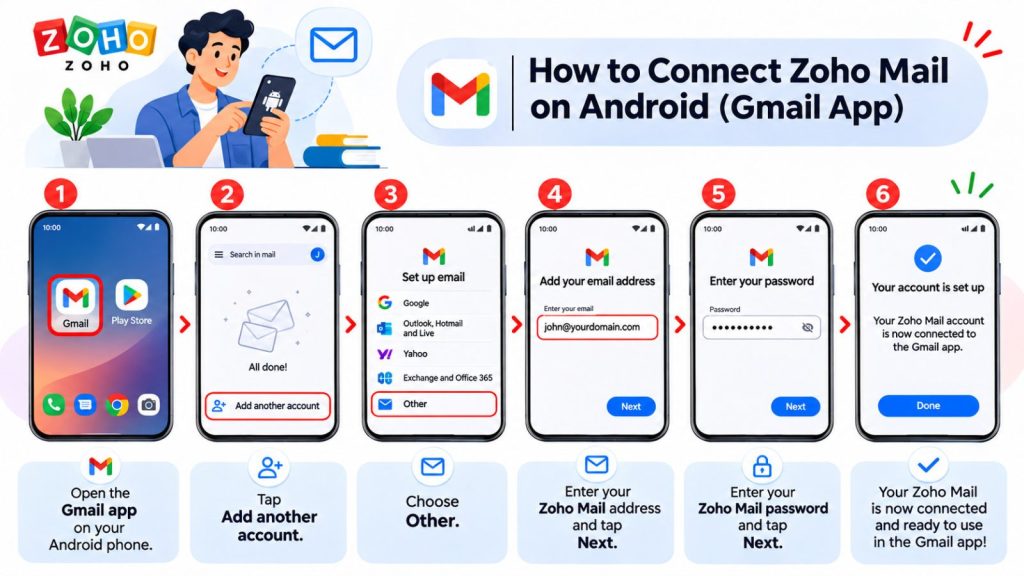
- Open the Gmail app on your Android phone or tablet.
- Tap your profile picture in the top-right corner and select Add another account → Other.
- Enter your full Zoho email address and tap Next.
- Select Personal (IMAP), enter your password, and tap Next. This option also applies to work email addresses on a custom domain. If you’ve enabled two-factor authentication in Zoho, use a Zoho app password.
- Enter the incoming server settings first, then the outgoing settings. To find the exact server names for your mailbox, open Zoho Mail and go to Settings → Mail Accounts → your primary account.
| Setting | Incoming Mail (IMAP) | Outgoing Mail (SMTP) |
|---|---|---|
| Server | imappro.zoho.eu | smtppro.zoho.eu |
| Username | Your full email address | The same email address |
| Password | Your Zoho password or app password | The same password |
| Port | 993 | 465 |
| Security type | SSL/TLS | SSL/TLS |
| Require sign-in | Use your account credentials | Turn this on if the option appears |
For example, a paid custom-domain mailbox in Zoho’s EU data center may use imappro.zoho.eu for incoming mail and smtppro.zoho.eu for outgoing mail. If your account shows different host names, use those.
- Follow the remaining prompts. Tap your profile picture to switch to your Zoho mailbox.
- Send a test message to another address you can access, then reply from that address to check that you can both send and receive mail.
Troubleshooting
- Gmail can’t connect to your account. Check that IMAP is enabled in Zoho, the incoming server name is correct, and you’ve entered your full email address. If you use two-factor authentication, check that you entered your Zoho app password.
- You can receive email but can’t send it. Check the SMTP host name, port
465,SSL/TLS, and the username and password in the outgoing server settings.
Option 2 — Use the Zoho Mail app
- Install Zoho Mail – Email and Calendar by Zoho Corporation from Google Play.
- Open the app and sign in to your Zoho account. Complete two-factor verification if prompted.
- Open your Inbox and allow notifications if you’d like alerts for new messages.
The app connects to your mailbox when you sign in, so you can skip the manual IMAP and SMTP setup.